
🎁 BLACK FRIDAY: 70% OFF every tool — automatically✦ No code needed · 70% off original prices✦ New: ADHD Budget Command Center PRO✦ Instant download · No subscription · Free updates✦ Need something unique? Design your own tool →

Category: Guides

  • What Budgeting Method Works for ADHD? 5 Methods Compared

    What Budgeting Method Works for ADHD? 5 Methods Compared

    If you have ADHD and every budget you have tried falls apart within a few weeks, the problem is probably not you. Most budgeting methods were designed for brains that enjoy tracking, categorising and planning ahead. ADHD brains tend to need the opposite: fewer decisions, instant feedback and something that works even on a bad week. So which budgeting method actually works for ADHD? Below we compare five popular methods honestly, and explain what to look for.

    What makes budgeting hard with ADHD

    • Time blindness: payday feels far away, bills feel like surprises.
    • Working memory: it is hard to keep a running total in your head.
    • Impulse spending: the urge to buy arrives faster than the “should I?” thought.
    • Boredom: long spreadsheets and daily logging get abandoned quickly.
    • Shame spirals: one missed week can make you quit the whole system.

    A method that works with ADHD has to reduce all five. Let’s see how the common ones compare.

    1. The 50/30/20 rule

    How it works: 50% of income for needs, 30% for wants, 20% for savings and debt.

    For ADHD: simple to understand, but hard to use day to day. It tells you the plan for the month, not whether you can afford a coffee today. Good as a starting rule, weak as a daily tool.

    2. Zero-based budgeting

    How it works: every dollar gets a job until income minus spending equals zero.

    For ADHD: powerful, but demanding. It requires frequent updates and many small decisions, which is exactly where ADHD energy runs out. Many people love it for two weeks and then stop.

    3. Cash envelopes

    How it works: you put cash for each category into envelopes; when an envelope is empty, spending stops.

    For ADHD: very visual and concrete, which is great. The downside is practical: most spending is now by card or phone, envelopes get lost, and it does not handle online subscriptions.

    4. Pay-yourself-first

    How it works: savings move automatically on payday, and you spend what is left.

    For ADHD: excellent, because automation removes decisions. But on its own it does not stop overspending the rest before the next payday.

    5. Safe-to-spend (one number) budgeting

    How it works: bills, savings and upcoming payments are taken out first, and you see a single number: what is safe to spend today, until payday.

    For ADHD: this is the method most ADHD adults stick with, because it turns budgeting into one glance and one question. No categories to remember, no mental math, and instant feedback after every purchase. We explain it in detail in how to know what you can safely spend until payday.

    Quick comparison

    • Easiest to start: 50/30/20 and pay-yourself-first.
    • Most control: zero-based.
    • Most visual: cash envelopes.
    • Best for daily ADHD life: safe-to-spend, combined with automatic savings.

    What to look for in an ADHD-friendly budget

    1. One number you can check in two seconds.
    2. One-tap logging for the things you buy most often.
    3. Bill reminders before money leaves, not after.
    4. A pause for impulse buys, such as a 48-hour wish list.
    5. No guilt design: missed days should not break anything.
    6. No subscription, because another monthly charge is the last thing you need.

    A tool built around this method

    The ADHD Budget App was designed around the safe-to-spend method. You open it and see exactly what is safe to spend today until payday. You log spending in one tap, park 2 a.m. “add to cart” urges in a 48-hour cool-off list, and see every bill and subscription on one calendar with reminders. It works on phone, tablet and computer, and you pay once with no subscription.

    The bottom line

    There is no perfect budget, only the one you will still be using next month. For most people with ADHD, that means fewer decisions and one clear number. Start there, automate your savings, and forgive yourself for missed days. For more ideas, read budgeting with ADHD: 9 practical strategies.

    This article is general information, not financial advice.
  • How to Reduce Waiting Time in Restaurants: 12 Proven Tactics

    How to Reduce Waiting Time in Restaurants: 12 Proven Tactics

    Long waits are the number one reason customers leave a bad review, and they rarely blame the kitchen. What people remember is the experience of waiting: standing at a crowded counter, not knowing if their order has been forgotten, and straining to hear a number being shouted. The good news is that most of the wait time in a busy restaurant, café or takeaway can be cut, and the wait that is left can feel much shorter. Here are 12 practical tactics, from the kitchen to the counter.

    Why wait time matters more than you think

    Research on queues has shown again and again that uncertain waits feel longer than known waits, and unoccupied time feels longer than occupied time. That means you can improve satisfaction in two ways: make the real wait shorter, and make the perceived wait shorter. The best restaurants do both.

    Part 1: Cut the real wait

    1. Find your true bottleneck

    Time one rush hour from start to finish: ordering, payment, kitchen, packing and hand-over. In most small businesses the slowest step is not cooking. It is the counter, where one person takes orders, takes payment and hands out food at the same time.

    2. Separate ordering from collection

    If customers order and collect at the same spot, the two queues block each other. Even a simple sign that says “Collect here” a few metres away keeps the line moving.

    3. Simplify the menu at peak times

    A shorter rush-hour menu, or a few “ready fast” combos, can cut average prep time noticeably. Highlight the quick items first on the menu board.

    4. Prep for the next 30 minutes

    Look at your sales history and prep the items you know will sell in the next half hour: sauces portioned, garnishes ready, packaging opened and stacked.

    5. Batch similar orders

    When three customers order the same drink, make all three at once. Many kitchens lose time by treating every ticket as a separate job.

    6. Stop staff from walking around

    Every trip a staff member makes to find a customer is time not spent preparing food. If your team is walking around the room or shouting names, you are paying for that wasted time.

    Part 2: Make the wait feel shorter

    7. Give every customer a clear number

    A number tells the customer “you are in the system, you have not been forgotten”. It also removes the awkward “is that mine?” moment at the counter.

    8. Let customers sit down

    Standing in a crowd makes five minutes feel like fifteen. If customers can sit and relax, the same wait feels far shorter, and your counter stays clear for new orders.

    9. Tell them, don’t shout

    Shouting numbers is stressful for staff and easy to miss for customers, especially with music, children or a noisy street. A quiet, personal notification works much better.

    10. Keep them busy while they wait

    Showing today’s offers, desserts or a loyalty deal during the wait gives people something to look at, and often adds a drink or dessert to the order.

    11. Show progress on a screen

    A simple screen with “Preparing” and “Ready” lists lets customers see their order moving. Visible progress is one of the strongest ways to reduce the feeling of waiting.

    12. Ask for feedback right after pickup

    The moment a customer receives their food is the best time to ask for a review. Happy customers are most likely to leave one then, and unhappy ones can tell you privately before they post publicly.

    How a QR code calling system ties it all together

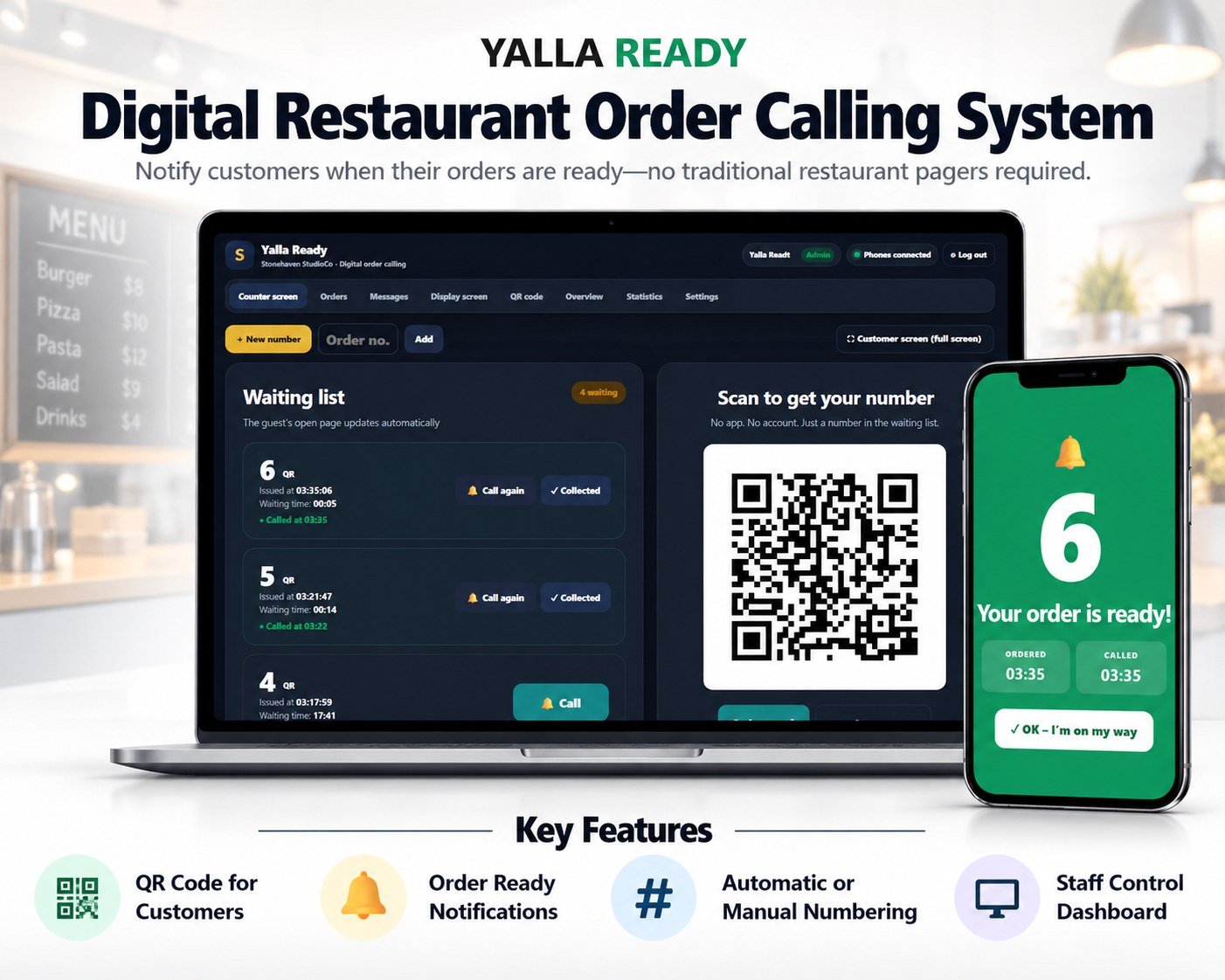
    Tactics 6 to 12 all point to the same tool: a calling system that uses the customer’s own phone. With Yalla Ready, the customer scans a QR code at the counter and their number appears on their phone straight away. They sit down, and when the order is ready, staff press one button and the customer’s phone rings with their number. At the same time, a display screen shows the number to the whole room.

    • No shouting and no walking around to find customers.
    • No pagers to buy, charge, clean or lose.
    • Offers and photos on the customer’s phone while they wait.
    • Customers can message you from their page, and rate you on Google after pickup.
    • Analytics show where delays happen, by section and by staff member.
    • Five languages, your own logo and colours, and a one-time payment with no monthly fees.

    You can try the full tool free for 2 days in your own restaurant before you decide. Arabic-speaking owners can read the Arabic page here.

    Quick checklist for your next rush

    • Have I timed every step and found the real bottleneck?
    • Is ordering separated from collection?
    • Does every customer get a clear number?
    • Can customers sit down instead of crowding the counter?
    • Am I notifying customers quietly instead of shouting?
    • Am I asking happy customers for a Google review right after pickup?

    Small changes add up. Fix the bottleneck, give people a number, let them sit, and call them quietly. Your customers will feel the difference, and so will your reviews.

    Related: Restaurant pager alternative: how QR code order calling works

  • How to Know What You Can Safely Spend Until Payday

    How to Know What You Can Safely Spend Until Payday

    “Can I afford this?” Most people answer that question by glancing at their bank balance. The problem is that your balance is not your spending money – part of it already belongs to rent, bills and subscriptions that have not left your account yet. Here is a simple way to calculate what you can actually spend until your next payday.

    This article is general information, not financial advice.

    Step 1: Start with what you have now

    Add up the money in the accounts you use for everyday spending. Do not include savings you do not want to touch.

    Step 2: Subtract every bill due before payday

    List every bill, subscription, loan payment and transfer that will leave your account before your next paycheck arrives. Subtract all of them. This is the step most people skip – and the reason a “healthy” balance suddenly feels empty.

    Step 3: Set aside savings and a small buffer

    If you want to save something this pay period, subtract it now, before you spend. Also keep a small buffer for surprises such as a pharmacy visit or a forgotten payment.

    Step 4: Divide by the days until payday

    What is left is your safe-to-spend amount for the whole period. Divide it by the number of days until payday to get a daily amount.

    A simple example

    • Money in your account: 1,200
    • Bills before payday (phone, internet, streaming, insurance): 380
    • Savings goal for this period: 150
    • Buffer: 70
    • Safe to spend: 600
    • Days until payday: 12
    • Daily safe-to-spend: 50

    Now “Can I afford this?” has a clear answer. A 30 purchase today fits. A 200 purchase means spending less on other days, or waiting.

    Why a daily number works so well

    • It is one number – easy to remember and easy to check.
    • It already includes your bills, so you do not get surprised.
    • It adjusts itself: spend less today and tomorrow’s number goes up.
    • It turns payday into a countdown you can feel.

    Keep it updated without the maths

    The method is simple, but recalculating it every day is easy to forget. ADHD Budget Command Center PRO does it for you: it shows your safe-to-spend number, upcoming bills, a payday countdown and a forecast of your lowest balance, on your phone, tablet or computer, with no subscription. Try the free demo to see your own number.

  • Budgeting With ADHD: 9 Practical Strategies That Actually Stick

    Budgeting With ADHD: 9 Practical Strategies That Actually Stick

    If you have ADHD and every budget you have tried lasted about a week, you are not lazy and you are not bad with money. Most budgeting methods depend on things ADHD makes harder: remembering, planning ahead, repeating boring tasks and resisting impulses. The answer is not more willpower – it is a system designed around how your brain works. Here are practical strategies that actually stick.

    This article shares general money tips, not financial or medical advice.

    Why traditional budgets fail with ADHD

    • Too many categories: twenty spending categories is overwhelming.
    • Out of sight, out of mind: bills you cannot see are bills you forget.
    • Time blindness: “payday” and “end of the month” feel abstract.
    • Tracking fatigue: logging every coffee gets dropped fast.
    • Impulse buys: the decision happens before the thinking.

    1. Focus on one number: safe to spend

    Instead of tracking ten categories, ask one question: “How much can I safely spend today until payday?” Take your money, subtract upcoming bills and savings, divide by the days left. One number is easy to check and hard to ignore.

    2. Make bills visible before they hit

    List every bill and subscription once, with its due date. Then make sure you see what is coming in the next 7–14 days every time you check your money. Surprise bills are what break most ADHD budgets.

    3. Make time visible

    A payday countdown (“9 days until payday”) turns an abstract date into something your brain can feel. It also makes it easier to decide whether a purchase can wait.

    4. Add a cool-off list for impulse buys

    When you want something that is not essential, put it on a “cool-off” list instead of buying it immediately. Check the list after 48 hours. Many items lose their pull; the ones that remain are real wants.

    5. Track fast, sort later

    Perfect tracking is the enemy of any tracking. Save spending in a few seconds and sort the details later when you have time. Something recorded is better than nothing recorded.

    6. Do a 10-minute money check-in

    Pick one short, regular moment – for example Sunday evening. Look at your safe-to-spend number, upcoming bills and anything you need to sort. Ten minutes is small enough to actually happen.

    7. Pick just one thing to do today

    Money to-do lists become overwhelming quickly. Choose one small action each day – cancel a subscription, pay a bill, move money to savings – and stop there.

    8. Make it visual and pleasant

    Colours, progress bars and clear layouts help the ADHD brain engage. If your budget looks like a tax form, you will avoid it.

    9. Forgive the bad weeks

    You will miss days. The goal is to come back quickly, not to be perfect. A system that is easy to restart is better than a perfect system you abandon.

    A budget app designed around these ideas

    ADHD Budget Command Center PRO shows one clear safe-to-spend number, keeps bills and subscriptions visible before they hit, gives you a payday countdown and balance forecast, includes a cool-off list for impulse buys and lets you save spending in seconds and sort it later. It works on your phone, tablet and computer, with no subscription – and you can try the free demo first.

  • 9 Ways to Reduce Waiting Frustration at Your Café or Takeaway Counter

    9 Ways to Reduce Waiting Frustration at Your Café or Takeaway Counter

    Customers rarely complain about waiting itself. They complain about not knowing – not knowing how long, not knowing if their order was forgotten, not knowing if they can step away. The good news: you can make waiting feel shorter and calmer without making the kitchen faster. Here are practical ideas for cafés, takeaway counters, food trucks and quick-service restaurants.

    1. Give every customer a clear number

    A visible order number removes the “was I forgotten?” feeling. It also stops people crowding the counter and asking staff for updates.

    2. Stop shouting numbers

    Shouting is stressful for staff, easy to miss for customers and unpleasant in a busy room. A screen or a phone notification is quieter and more reliable.

    3. Let customers wait where they want

    If customers know they will be notified, they can sit down, step outside or browse nearby. A notification on their own phone gives them that freedom.

    4. Show progress on a screen

    A simple display with “Preparing” and “Ready” columns tells everyone where their order is. Seeing their number move is reassuring.

    5. Use waiting time for something useful

    Waiting customers are a captive audience. Show your desserts, drinks, combo deals or loyalty offers while they wait – it feels helpful rather than pushy.

    6. Make it easy to ask a question

    Give customers a way to send a short message (“Can I get it without onions?”) without queueing again.

    7. Ask for feedback at the right moment

    Right after pickup is the best time to ask for a quick rating. Happy customers can be invited to leave a public review; unhappy ones can tell you privately so you can fix the problem.

    8. Measure your waiting times

    You cannot improve what you do not measure. Track average preparation and pickup time and your busiest hours, then adjust staffing and prep accordingly.

    9. Train one simple routine

    Whatever system you choose, make it the same every time: take the order, give the number, call the number, hand over. Consistency is what customers notice.

    Put it all together with Yalla Ready

    Yalla Ready brings these ideas into one browser-based tool: customers scan a QR code to get a number, their phone rings when the order is ready, a counter screen and TV display show progress, offers appear while they wait, guests can send messages, and statistics show your preparation and pickup times. No pager devices and no monthly fees.

  • Restaurant Pager Alternative: How QR Code Order Calling Works

    Restaurant Pager Alternative: How QR Code Order Calling Works

    Restaurant pagers – the buzzing coasters you hand to customers – have been the standard for years. But they cost money up front, get lost or broken, run out at busy times and need charging and cleaning. Many restaurants, cafés and food trucks are now switching to a simpler option: using the customer’s own phone. Here is how a QR code order calling system works and what to look for.

    The problems with traditional pagers

    • Upfront cost: a set of pagers plus a charging base is a real investment for a small business.
    • Losses and damage: pagers get dropped, taken home or stop working.
    • Limited numbers: on a busy day you can simply run out.
    • Hygiene: shared devices need regular cleaning.
    • Limited range: customers have to stay close to the counter.

    And without pagers, staff end up shouting numbers over noise and music.

    How QR code order calling works

    1. The customer scans a QR code at the counter or on the receipt.
    2. A number appears on their phone instantly – no app download and no account.
    3. Staff press “Call” when the order is ready.
    4. The customer’s phone rings and vibrates and shows that the order is ready.

    Customers already carry their phones, so there is nothing to hand out, collect or charge.

    Benefits for your business

    • No hardware to buy – it runs in the browser on a laptop, tablet or phone you already own.
    • Unlimited numbers – every scan creates a new one.
    • A calmer counter – no shouting, fewer customers crowding the pickup area.
    • Marketing while they wait – show offers or menu pictures on the customer’s screen.
    • Better feedback – ask for a quick rating after pickup.

    What to look for in a pager alternative

    • No app required for customers
    • Works on any device with a modern browser
    • A customer-facing screen or TV display for “Preparing” and “Ready” numbers
    • Your own logo and colours on the customer page
    • Support for the languages your customers speak
    • Clear pricing – ideally a one-time purchase rather than a monthly fee

    Things to keep in mind

    A phone-based system needs an internet connection, and customers should keep the page open with sound on so they hear the alert. A small sign next to the QR code (“Scan, keep this page open, we’ll call you”) solves most questions.

    Yalla Ready: a QR order calling system for restaurants and cafés

    Yalla Ready turns your customers’ phones into order pagers. Customers scan, get their number instantly and their phone rings when the order is ready. It includes a counter screen, a TV display, offers while waiting, guest messages, ratings and statistics, in five languages including Arabic and English – with no pager devices and no monthly subscription.

  • How to Keep a Custody Journal: What to Record and Why It Matters

    How to Keep a Custody Journal: What to Record and Why It Matters

    A custody journal is a simple, regular record of your co-parenting life: who had the children and when, what happened at exchanges, what was discussed, and what was spent. Done well, it protects you, helps you remember details and gives professionals a clear picture. Done badly, it becomes an emotional diary nobody can use. Here is how to keep one that actually helps.

    This article is general information, not legal advice.

    Why keep a custody journal?

    • Accuracy: dates and times are hard to remember months later.
    • Patterns: repeated late exchanges or missed calls only become visible when they are written down.
    • Calm: writing facts down can reduce the urge to argue in the moment.
    • Preparation: mediators and lawyers work faster with organised information.

    What to record in your custody journal

    1. Parenting time and overnights

    Note which parent had the children each day and night. Over time this shows the real schedule compared with the court order.

    2. Exchanges

    Record the scheduled time, actual time, location and anything notable (for example, a child who was upset or not dressed for school).

    3. Communication

    Log important messages and calls by date and topic: schedule changes, school issues, medical decisions. Keep copies of the original messages.

    4. Incidents

    Anything that goes against the parenting plan or affects the children’s wellbeing. Keep it short and factual.

    5. Health, school and activities

    Doctor visits, medication, school meetings, report cards and activities. This shows your involvement in daily life.

    6. Expenses and child support

    Payments made and received, shared costs and receipts. Money disagreements are easier to settle with clear numbers.

    How to write a good entry

    Use the same structure every time: date, time, place, what happened, who was there, effect on the child. Write in neutral language and avoid guessing the other parent’s intentions. Short and consistent beats long and emotional.

    Paper, spreadsheet or app?

    • Paper notebook: easy to start, but hard to search, easy to lose and impossible to turn into a report.
    • Spreadsheet: searchable, but slow on a phone and easy to fall behind with.
    • Dedicated app: designed for quick entries on your phone, keeps evidence attached and creates summaries for you.

    The best method is the one you will actually use every day.

    Tips to stay consistent

    • Set a daily two-minute reminder at the same time each evening.
    • Write a short entry even on calm days (“Exchange on time, no issues”).
    • Back up your records regularly.
    • Keep the journal private and do not share it on social media.

    Try a custody journal built for high-conflict co-parenting

    High Conflict Custody PRO gives you dedicated sections for parenting time, exchanges, incidents, communication, health, school, expenses and evidence, plus ready-made reports when you need to share a summary. Prefer to log in from anywhere? Choose the Cloud edition.

  • How to Document Custody Violations: A Step-by-Step Guide for Parents

    How to Document Custody Violations: A Step-by-Step Guide for Parents

    When a parenting plan is not being followed, most parents feel the same thing: frustration, and the fear that nobody will believe them. The difference between “he said, she said” and a clear record is documentation. This guide explains how to document custody violations calmly, consistently and in a way that is easy for a lawyer, mediator or judge to understand.

    This article is general information, not legal advice. Rules differ by state and country, so always check with a family law professional about your own case.

    What counts as a custody violation?

    A violation is any situation where the other parent does not follow the court order or written parenting plan. Common examples include:

    • Late pick-ups or drop-offs, or missed exchanges
    • Withholding the child or refusing scheduled parenting time
    • Blocking phone or video calls that the plan allows
    • Making decisions alone that the order says must be shared (school, medical, travel)
    • Moving or travelling with the child without the required notice
    • Not paying agreed child support or shared expenses

    Before you start, read your order again and note the exact wording. Your records are strongest when each entry connects to a specific part of the order.

    Step 1: Write it down the same day

    Memories fade and details blur. Record every incident on the day it happens, while it is fresh. Each entry should answer the same questions:

    • When: date and exact time (scheduled time and actual time)
    • Where: location of the exchange or event
    • What happened: short, factual description
    • Which rule: the section of the order that was not followed
    • Who was present: witnesses, if any
    • Impact on the child: missed school, missed activity, visible distress

    Step 2: Stick to facts, not feelings

    Courts look for patterns and facts. Compare these two entries:

    • “He was late AGAIN and clearly doesn’t care about our son.” – emotional, hard to use
    • “Scheduled pick-up 5:00 pm. Arrived 6:20 pm. No message before 6:05 pm. Child missed football practice at 5:30 pm.” – factual, useful

    Write as if a stranger will read it, because one day someone might.

    Step 3: Keep the evidence with the entry

    A note is stronger when it is supported. Save screenshots of messages, emails, receipts, school notices and photos, and store them next to the incident they belong to. Name files clearly with the date so they are easy to find later.

    Step 4: Track the full picture, not only incidents

    Judges also want to see what went right. Keep a simple record of every scheduled exchange and every overnight, including the ones that happened on time. This shows that you are fair and consistent, and it makes real patterns stand out.

    Step 5: Keep communication records organised

    Most conflict happens in messages. Keep communication in writing where possible, stay brief and polite, and log important conversations by date and topic. Avoid arguing in writing – your own messages will be read too.

    Step 6: Summarise before you meet your lawyer

    Lawyers and mediators are busy. A one-page summary of how many exchanges were late, how many calls were missed and how much money is unpaid is far more useful than a thick folder of unsorted notes.

    Common mistakes to avoid

    • Recording weeks later from memory
    • Mixing personal opinions into the log
    • Keeping notes in five different places
    • Only recording the other parent’s mistakes and none of your own exchanges
    • Posting about the conflict on social media

    A simpler way to keep all of this in one place

    Paper notebooks and spreadsheets work, but they are easy to forget and hard to turn into a clear report. High Conflict Custody PRO is a private custody documentation app that keeps parenting time, exchanges, incidents and violations, communication records, expenses and evidence together, and turns them into organised reports. If you want to access your records from any device, the Cloud edition works fully online in your browser.

    Whatever tool you use, the most important habit is the same: write it down the same day, keep it factual, and keep it in one place.

Subscribe with us

Be the first to know

Get new tools, product updates and exclusive offers & discounts only for subscribers, straight to your inbox.

  • New tools & updates
  • Subscriber-only offers
  • Exclusive discounts

No spam. Unsubscribe anytime.