





Description
The ADHD budget app that tells you exactly what you can spend — no guessing.
You check your bank app, do quick math in your head, feel unsure, and buy it anyway. Then a bill arrives and payday still feels far away. It is not a willpower problem. You just have not had an ADHD budget app built for you. Most budget tools were simply not built for how an ADHD brain works.
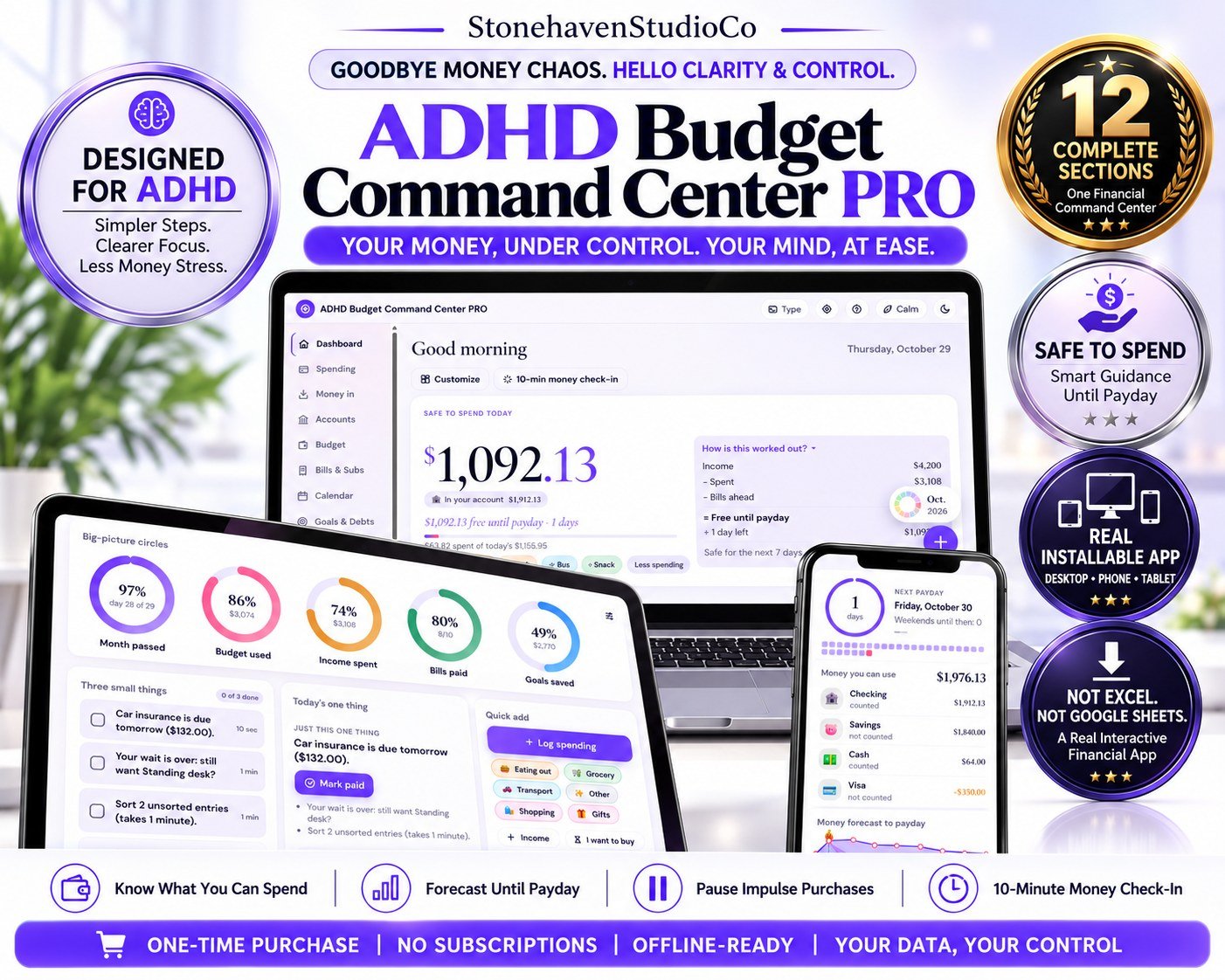
ADHD Budget Command Center PRO turns your money into one calm, colorful screen. It shows you what is safe to spend today, what is coming next, and the one small thing to do now — so you feel in control in minutes, not hours.
▶ Try the free demo — no sign-up
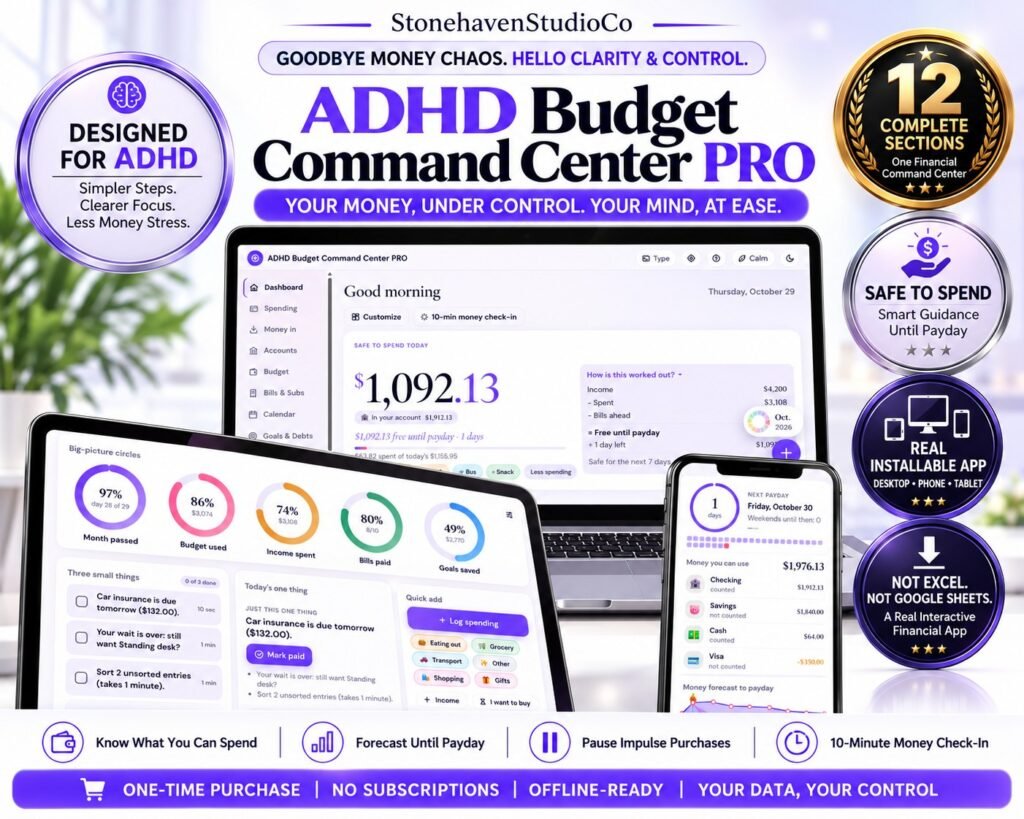
Built for real ADHD money moments
✔ “Can I afford this?” — Safe to Spend answers instantly, with a simple breakdown you can trust.
✔ “I forgot that bill again.” — Bills and subscriptions are set once and always shown before they hit.
✔ “Payday feels so far away.” — A payday countdown and balance forecast show if your money will last.
✔ “I bought it on impulse.” — The Cool-off List pauses impulse buys until you are sure.
✔ “I can’t keep up with tracking.” — Save in seconds and use “Sort later” when you are busy.
Everything inside the ADHD budget app
💜 Safe to Spend dashboard — your one most important number, plus a 10-minute money check-in and “today’s one thing” to keep you focused.
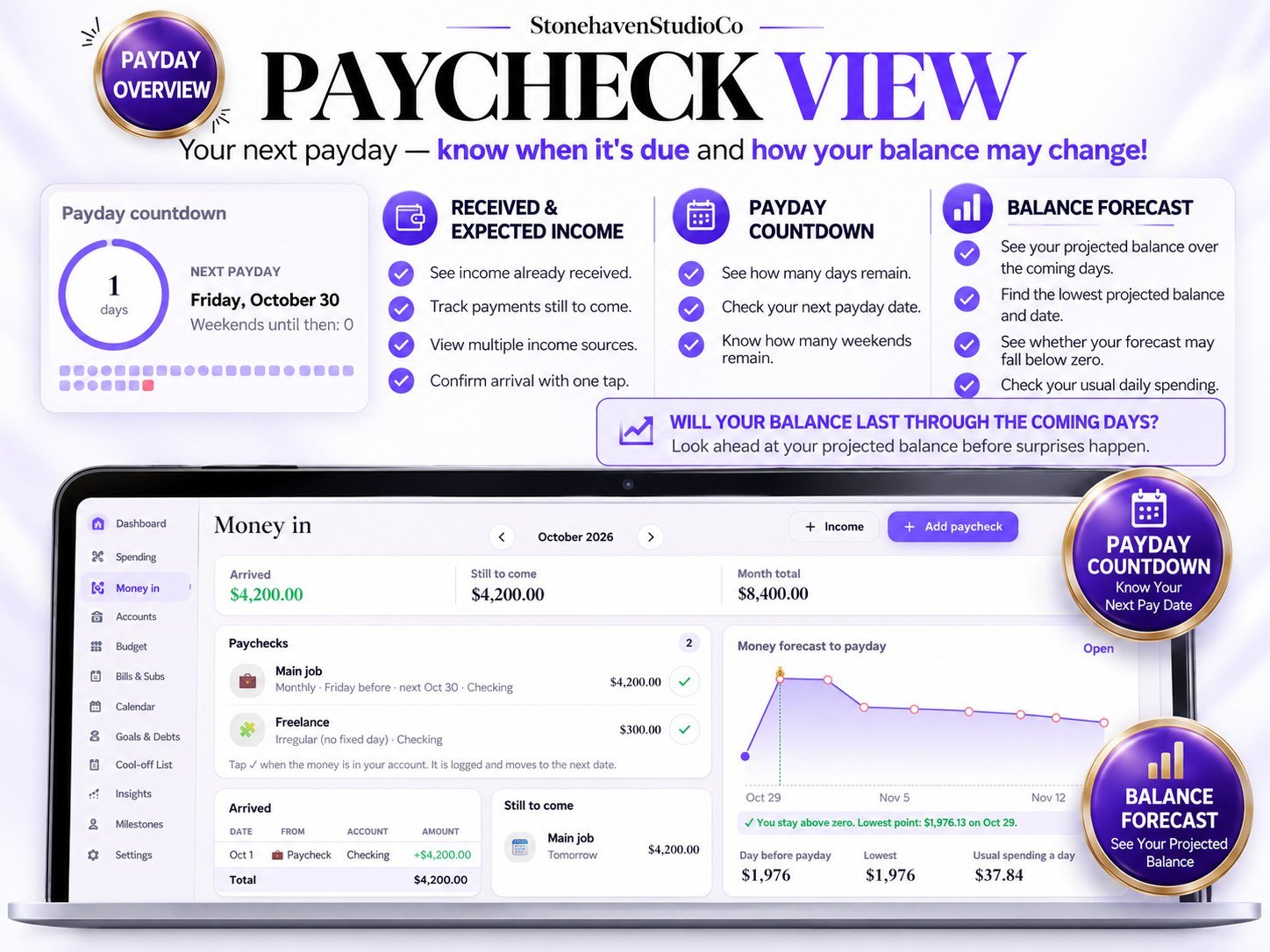
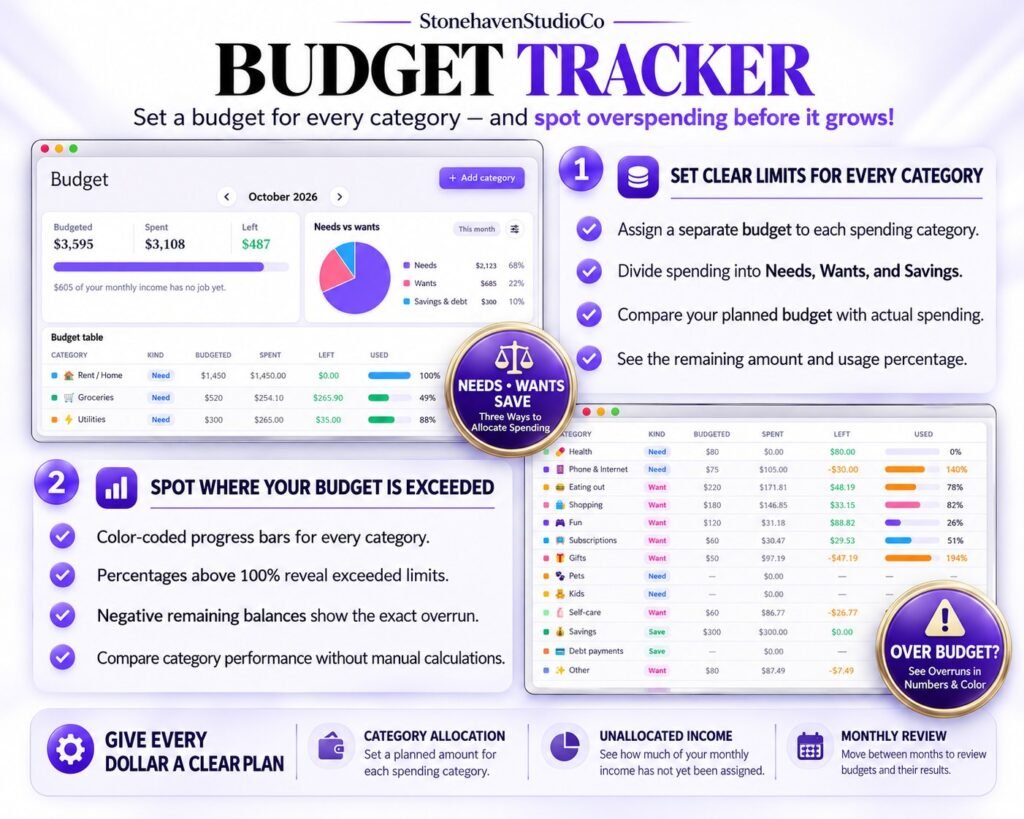
📅 Paycheck view — payday countdown, expected income, multiple income sources and a forecast of your lowest balance before it happens.
🧾 Smart transaction log — import bank CSV files, add receipt photos, flag impulse buys and split costs with someone.
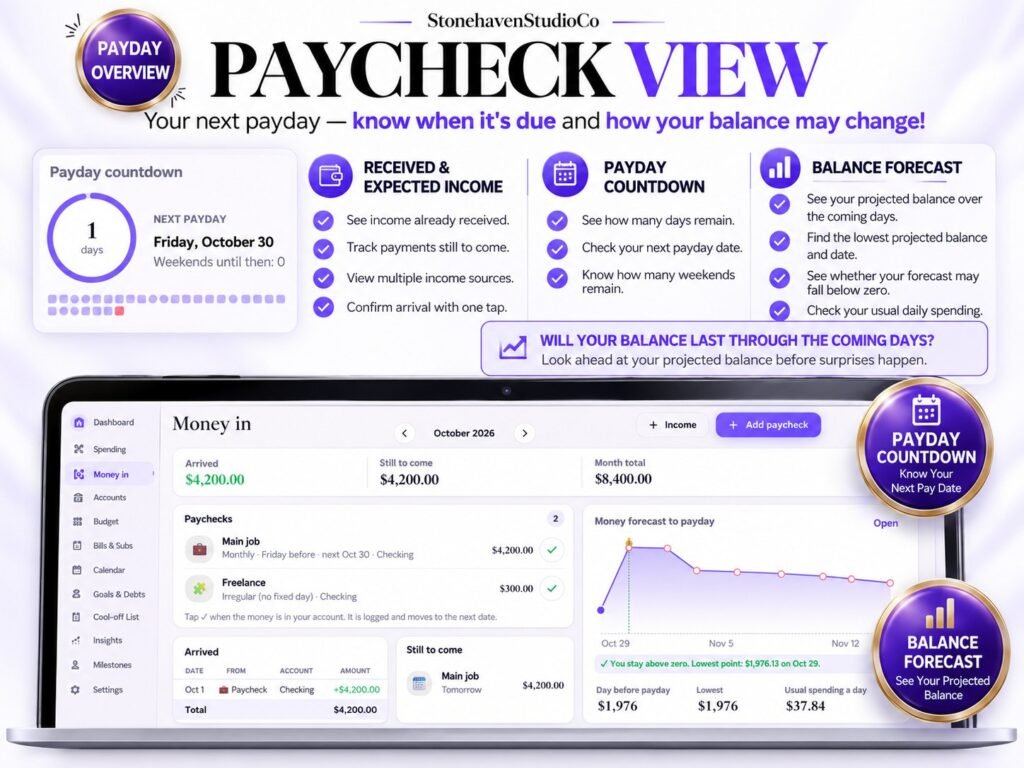
📊 Budget tracker — a limit for every category, Needs vs Wants vs Savings, and clear colors when you go over.
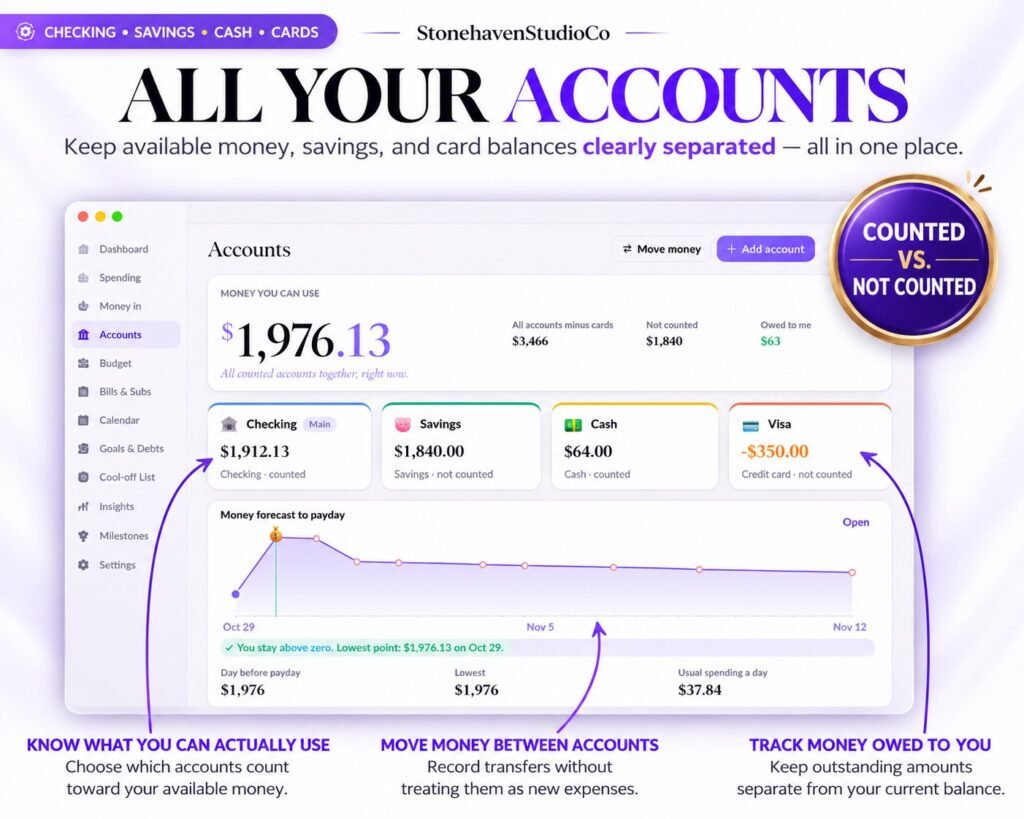
🏦 All your accounts — checking, savings, cash and cards, with money owed to you kept separate.
🔁 Automations — set paychecks, bills, debts, subscriptions and savings once. Weekly, every 2 weeks, monthly and more.
🎯 Goals & motivation — savings goals, debt payoff plans and 16 milestones that celebrate your progress.
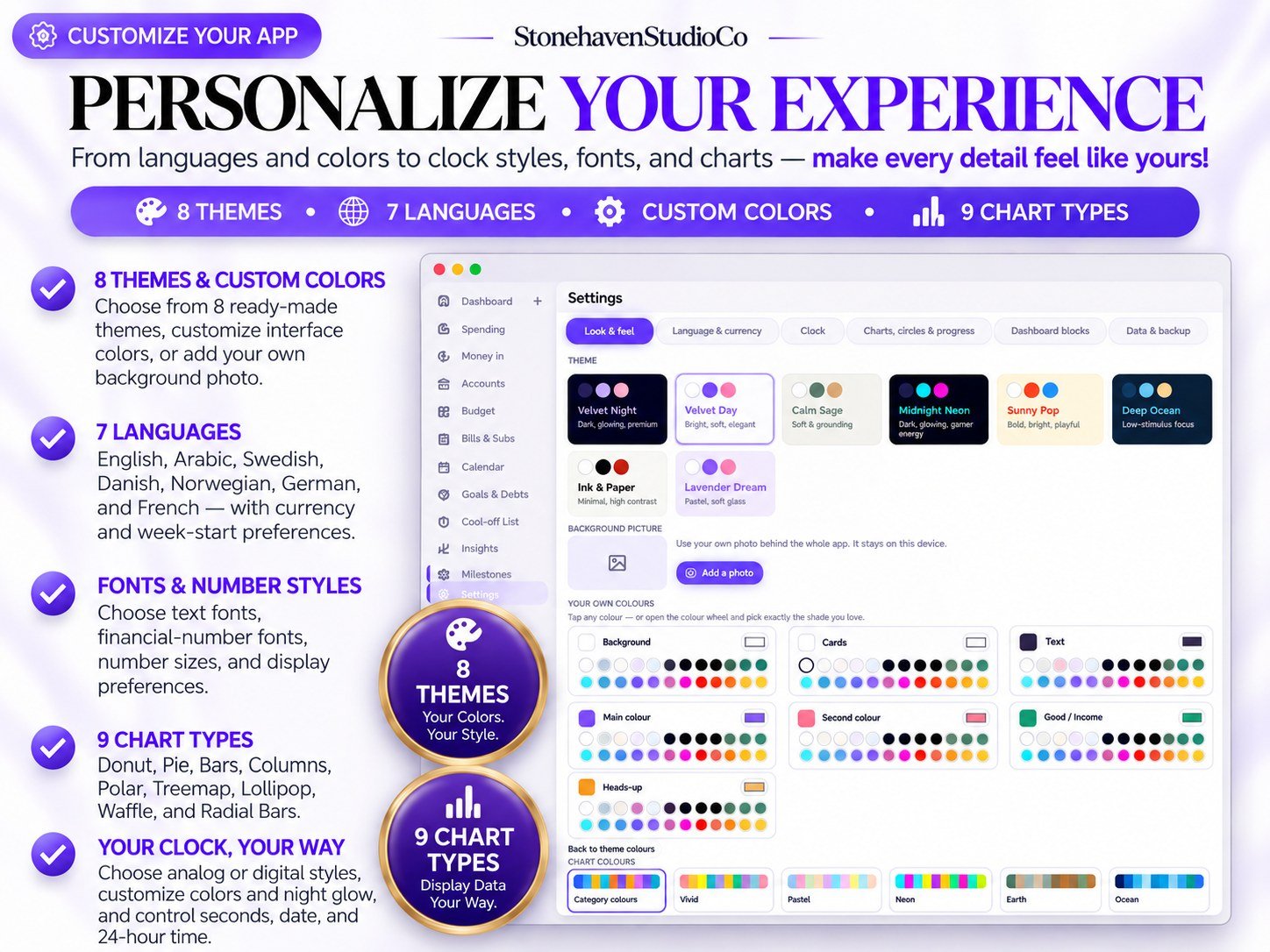
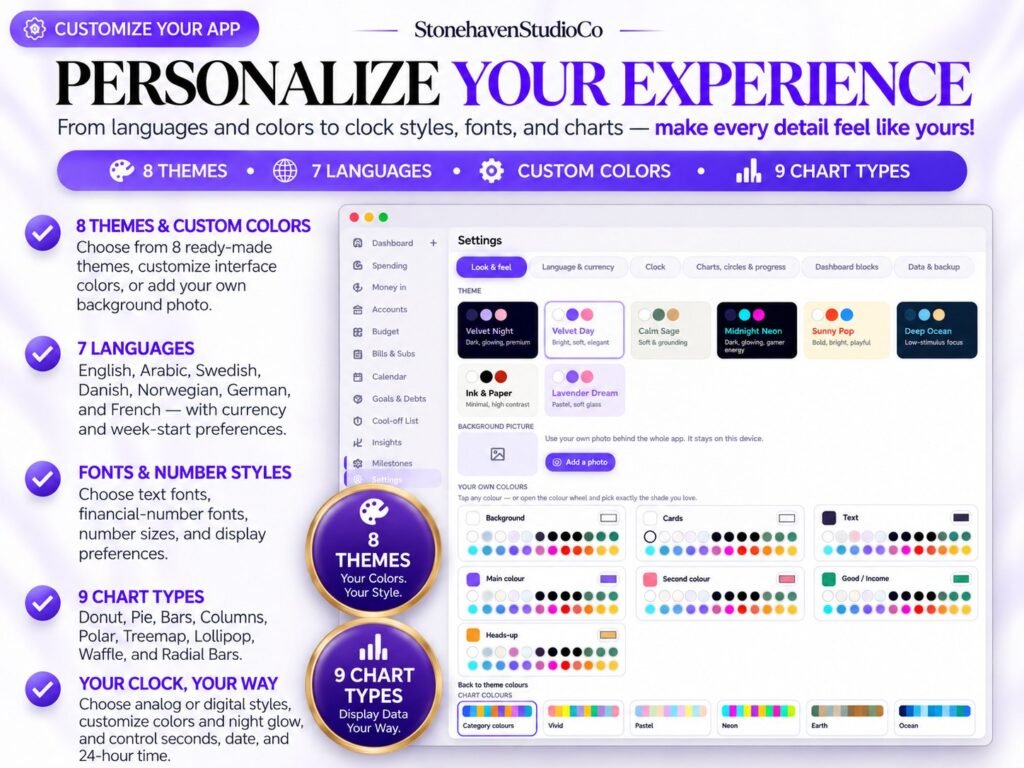
🎨 Make it yours — 8 beautiful themes, your own colors and background photo, 9 chart types and 33 dashboard widgets.
▶ See it in action — open the free demo
Why people choose it over spreadsheets and subscriptions
| Spreadsheets | Budget apps | ADHD Budget PRO | |
|---|---|---|---|
| Designed for ADHD | ✖ | ✖ | ✔ |
| Safe-to-spend until payday | ✖ | Sometimes | ✔ |
| Works on phone, tablet & computer | Hard | ✔ | ✔ |
| Your data stays private | ✔ | ✖ | ✔ |
| Monthly fees | None | Every month | None — pay once |
🔒 Your money stays private
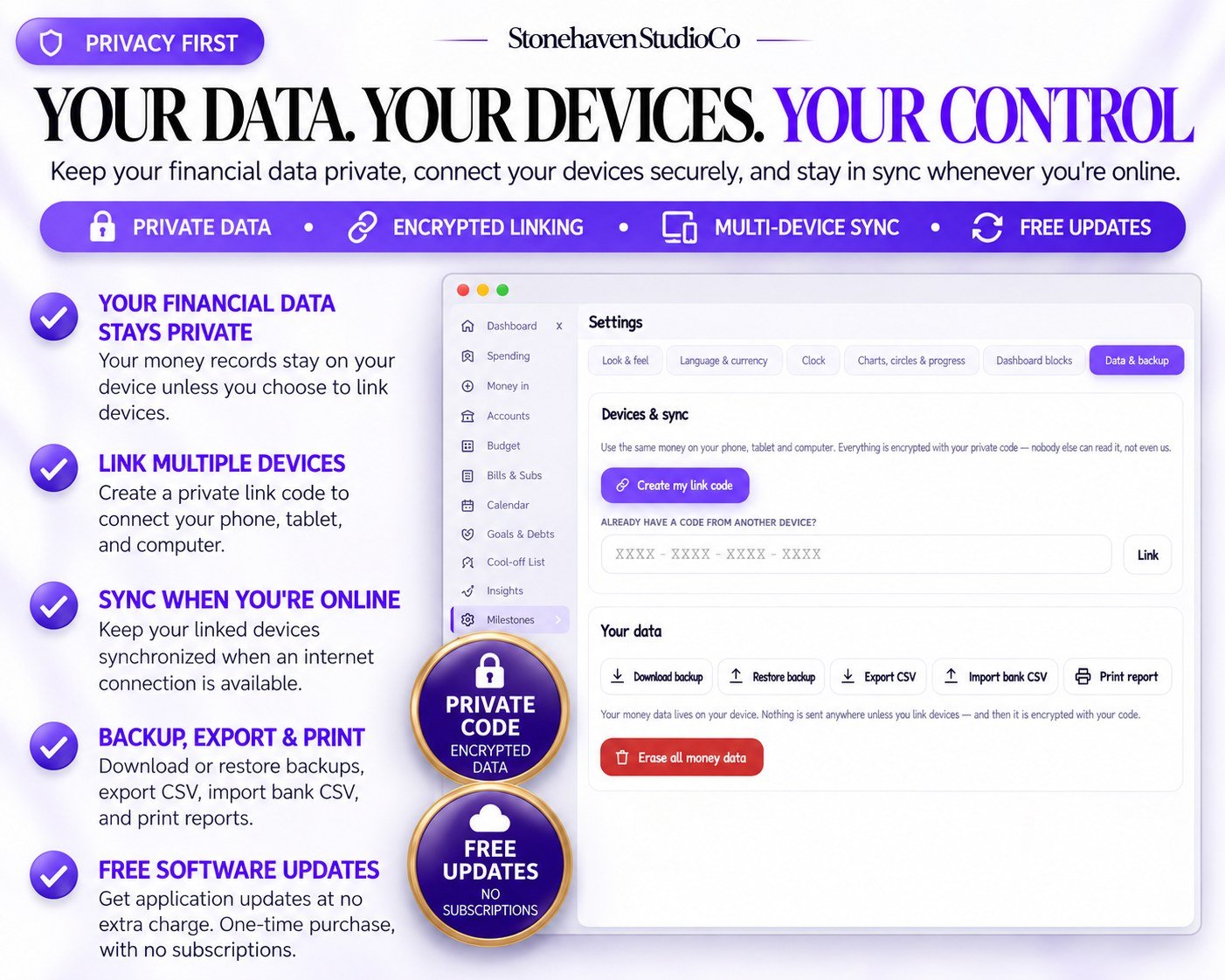
Your records stay on your own device. Want it on your phone and computer? Link them with a private code — your data is encrypted and syncs when you are online. Backups, CSV export and printable reports keep you in full control.
🌍 Speaks your language
English, Arabic, Swedish, Danish, Norwegian, German and French — with 50 currencies and your own week start.
What you get today
✔ Instant access right after secure checkout
✔ The full app with all 12 sections
✔ Install it like an app on Windows, Mac, iPhone and Android
✔ Free updates included
✔ One payment. No subscription. Ever.
Why traditional budgeting fails with ADHD
Classic budgeting asks you to plan the whole month in advance, write down every purchase, and review long tables of numbers at the end of the month. For an ADHD brain, every one of those steps is a wall. Planning far ahead is hard when time feels like “now” and “not now”. Writing down every purchase relies on working memory at the exact moment you are distracted. And reviewing a spreadsheet full of numbers is boring in a way that makes it easy to put off forever.
The result is a familiar cycle: a burst of motivation, a beautiful new budget, a few good days, and then a slow drift back to guessing. It is not a character flaw. The tools were designed for a different kind of brain. An ADHD budget app flips the approach: one clear number instead of a full plan, quick capture instead of perfect records, colours instead of columns, and reminders that remember things for you.
ADHD budget app vs other budgeting apps
Many popular budgeting apps are powerful, but they expect you to give every dollar a job, reconcile accounts regularly and pay a subscription every month. Others connect to your bank and fill your screen with dozens of charts and categories. Both can feel overwhelming. This ADHD budget app is built around the questions you actually ask in daily life: can I afford this, what is coming next, and will my money last until payday?
It also respects your privacy. There is no account to create and no bank login to share. Your data stays on your device, and sync between your own devices is protected with your private code. You pay once and keep the app, with free updates included.
Inside the ADHD budget app: a complete walkthrough
Here is a full tour of the ADHD budget app, so you know exactly what you are getting before you buy. Open the free demo and you can click through the same screens with a sample budget already filled in.
1. Safe to Spend dashboard
The heart of the ADHD budget app is one number: how much you can safely spend today without missing a bill. It takes your balance, your upcoming bills, your savings goals and the days left until payday, and turns them into a single, calm answer. Tap it to see the simple breakdown behind it. No more doing maths in your head at the checkout.
The dashboard also gives you a 10-minute money check-in and “today’s one thing”, a single small action that keeps you moving without overwhelm. You can arrange up to 33 widgets so the screen shows only what matters to you.
2. Paycheck view and payday countdown
ADHD brains struggle with time that feels far away. The paycheck view shows a countdown to your next payday, your expected income from every source, and a forecast of your lowest balance before it happens. If money will run short, the ADHD budget app warns you early, while you can still do something about it.
3. Smart transaction log
Add a purchase in seconds, or tap “sort later” when you are busy and categorise it when you have the energy. Import your bank CSV file instead of typing everything, attach receipt photos, flag impulse buys and split costs with a partner or a friend. Tracking finally becomes something you can keep up with.
4. Budget tracker with clear colours
Give every category a limit and see Needs, Wants and Savings at a glance. Colours change as you get close to a limit and turn red when you go over, so you notice before the month is gone. The ADHD budget app keeps it visual, because long tables of numbers are exactly what makes budgeting feel impossible.
5. All your accounts in one place
Checking, savings, cash and credit cards live side by side, with money that other people owe you kept separate so it never inflates your balance. You always know where your money actually is.
6. Automations: set it once
Paychecks, bills, debts, subscriptions and savings transfers can repeat weekly, every two weeks, monthly or on your own schedule. Set them once and the ADHD budget app shows them before they hit, so the “I forgot that bill again” moment disappears.
7. The Cool-off List for impulse buys
Want something right now? Put it on the Cool-off List instead. The app keeps it there for a few days. If you still want it later and Safe to Spend says yes, buy it with no guilt. Most impulse buys simply fade away, and the money stays in your account.
8. Goals, debt payoff and milestones
Create savings goals with target dates, plan your debt payoff, and celebrate 16 milestones along the way. Small wins matter for motivation, and the ADHD budget app makes every bit of progress visible.
9. Reports, backups and privacy
Print clear monthly reports, export to CSV and keep backups whenever you like. Your records stay on your own device. To use the same budget on your phone and computer, link them with a private code: your data is encrypted and syncs when you are online.
10. Make it yours
Choose from 8 themes, set your own colours and background photo, pick from 9 chart types and arrange 33 dashboard widgets. Use the app in English, Arabic, Swedish, Danish, Norwegian, German or French, with 50 currencies and your own week start. Lock it with a PIN or Face ID / fingerprint on supported devices.
What makes a good ADHD budget app?
When you compare options, look for five things. First, one clear answer instead of a wall of data: an ADHD budget app should tell you what you can spend right now. Second, very fast capture: adding a purchase must take seconds, with the option to sort it later. Third, reminders that work for you: bills and subscriptions should appear before they are due, without you having to remember them. Fourth, visual feedback: colours, progress bars and milestones make money feel real and keep motivation up. Fifth, low friction: no complicated setup, no long monthly reconciliation and no subscription that becomes one more bill to track.
Many apps promise simplicity, but this ADHD budget app was designed from the first screen around attention, time blindness and impulse spending. Every feature answers a real moment: the checkout, the surprise bill, the long week before payday, the late-night online shopping. That focus is what turns budgeting from a project you start every January into a habit that lasts.
If you have tried and failed with budgeting before, you are not alone, and it does not mean you are bad with money. It usually means the tool asked too much of your memory and attention. Give yourself a tool that asks less and gives more. Open the free demo, look at your Safe to Spend number, and feel the difference a calm ADHD budget app can make in a single afternoon.
Remember that budgeting is not about restriction. It is about knowing. When you know what is safe to spend, you can say yes to the things that matter to you without the guilt and anxiety that usually follow. You can treat yourself, help a friend or plan a weekend away, and still pay every bill on time. That feeling of calm confidence is what this app is really built to give you, every single day, starting from the moment you open it.
Try the free demo today, explore every screen at your own pace, and see how quickly the numbers start to make sense. When you are ready, unlock the full version and enter your own accounts, bills and goals. Your future self, standing at the checkout a few days before payday, will thank you for it.
A real example: one month with the ADHD budget app
Imagine Maya, who gets paid every two weeks and always feels broke a few days before payday. She enters her checking account, her two credit cards and her rent, phone, streaming and gym bills as automations. She sets a grocery limit, a fun-money limit and a small emergency savings goal.
The next morning, Safe to Spend tells her she can spend 34 today. When she sees a jacket online, she adds it to the Cool-off List. Three days later she no longer wants it. On Friday the forecast warns her that her balance will dip low before payday because of the car insurance, so she moves a little from savings in time. For the first time in months, payday arrives without panic, and her savings goal is a little fuller.
Budgeting tips for ADHD brains
Keep one number in focus instead of ten. Let automations remember the bills so your brain does not have to. Capture spending immediately and sort it later. Make it visual with colours and progress bars. Use a short weekly check-in instead of a long monthly review. Celebrate small wins, because motivation grows from progress you can see. Most of all, use an ADHD budget app that works with your brain instead of asking you to become someone else.
How to start in five minutes
Open the link you receive right after secure checkout and add the app to your home screen. Enter your accounts and current balances. Add your paycheck and your main bills as automations. Set two or three category limits. From that moment, the ADHD budget app shows your Safe to Spend number every day.
Who this ADHD budget app is for
It is made for adults with ADHD or ADD, for anyone who lives paycheck to paycheck and wants to break the cycle, for people who have tried spreadsheets and budgeting subscriptions and given up, and for couples who want one shared view of their money. You do not need to be good with numbers. The app does the maths, you make the decisions.
Why this ADHD budget app beats spreadsheets and subscriptions
A spreadsheet cannot remind you of a bill, forecast your lowest balance or sync between your phone and computer, and most budgeting apps charge you every month forever. This ADHD budget app does all of it for one payment, works offline and keeps your data private. Looking for more tools? Browse all Stonehaven StudioCo apps.
Questions
Does the ADHD budget app connect to my bank? No. For privacy, there is no bank login. You can import a CSV file exported from your bank whenever you like, or add transactions by hand in seconds.
Can my partner and I use the same budget? Yes. Link two devices with a private code and the budget syncs between them when you are online.
Does it work offline? Yes. After the first open the app works without internet, and changes sync later.
Is there a monthly fee? No. One payment, no subscription, free updates.
Do I need an ADHD diagnosis to use it? No. The ADHD budget app is designed for ADHD brains, but anyone who finds traditional budgeting overwhelming will find it simpler and calmer.
Is this an Excel or Google Sheets template?
No. It is a real interactive app that you open in your browser and can install on your devices.
Can I try it before I buy?
Yes. The free demo lets you explore and customize everything. Adding your own money is unlocked in the full version.
Do I need to be good with numbers?
No. The app does the math and shows you simple answers.
Is there a monthly fee?
No. You pay once and get free updates.
Your money, under control. Your mind, at ease.
Questions? Email support@stonehavenstudioco.com or use our contact page.





Reviews
There are no reviews yet.