


Description
This high conflict custody tracker runs in the cloud, so your records sync safely between your phone, tablet and computer — and you can share them with your attorney in one click. Log exchanges, missed visits, messages, expenses and incidents the moment they happen, with timestamps that hold up in court. Read about how family courts work, or see the offline custody tracker app.
What the high conflict custody tracker does for you
☁️ CUSTODY TRACKER PRO CLOUD
High-Conflict Child Custody Documentation App | Secure Cloud Sync, Attorney Sharing & Permanent Activity Log
48+ Powerful Tools | One-Time Purchase | No Monthly Subscriptions
The high conflict custody tracker that keeps every record in one place
This high conflict custody tracker is built for parents who need clear, dated and organised records of parenting time, exchanges, incidents, communication, expenses and evidence. Instead of screenshots in your gallery and notes in five different apps, everything lives in one secure cloud workspace you can open on your phone, tablet or computer.

🎥 WATCH OUR COMPLETE VIDEO TUTORIAL
See how High Conflict Custody Tracker PRO works before you buy!
Explore custody tracking, parenting schedules, incident documentation, evidence management, financial records, and professional reports through our step-by-step video tutorial with voiceover.
The tutorial covers both the Private and Cloud Editions, which share the same interface and core features.
▶️ Watch the Complete Tutorial:
https://www.youtube.com/watch?v=J6cDmq42IY8
⚖️ WHEN CUSTODY GETS COMPLICATED, YOUR DOCUMENTATION SHOULDN’T BE.
Missed visitations. Late exchanges. Unpaid child support. Broken agreements. Difficult communications. Important evidence scattered across messages, screenshots, emails, and documents.
Every important detail deserves an organized record.
High Conflict Custody Tracker PRO Cloud brings your custody documentation, parenting schedules, incidents, communications, financial records, evidence, and court-related deadlines together in one powerful digital system.
Designed for parents navigating high-conflict custody and co-parenting situations, this comprehensive high conflict custody tracker helps you create clear, dated, searchable records while keeping your information organized and accessible.
No more scattered spreadsheets, missing screenshots, or struggling to reconstruct what happened months ago.
Access your records from your computer, tablet, or smartphone using one private account.
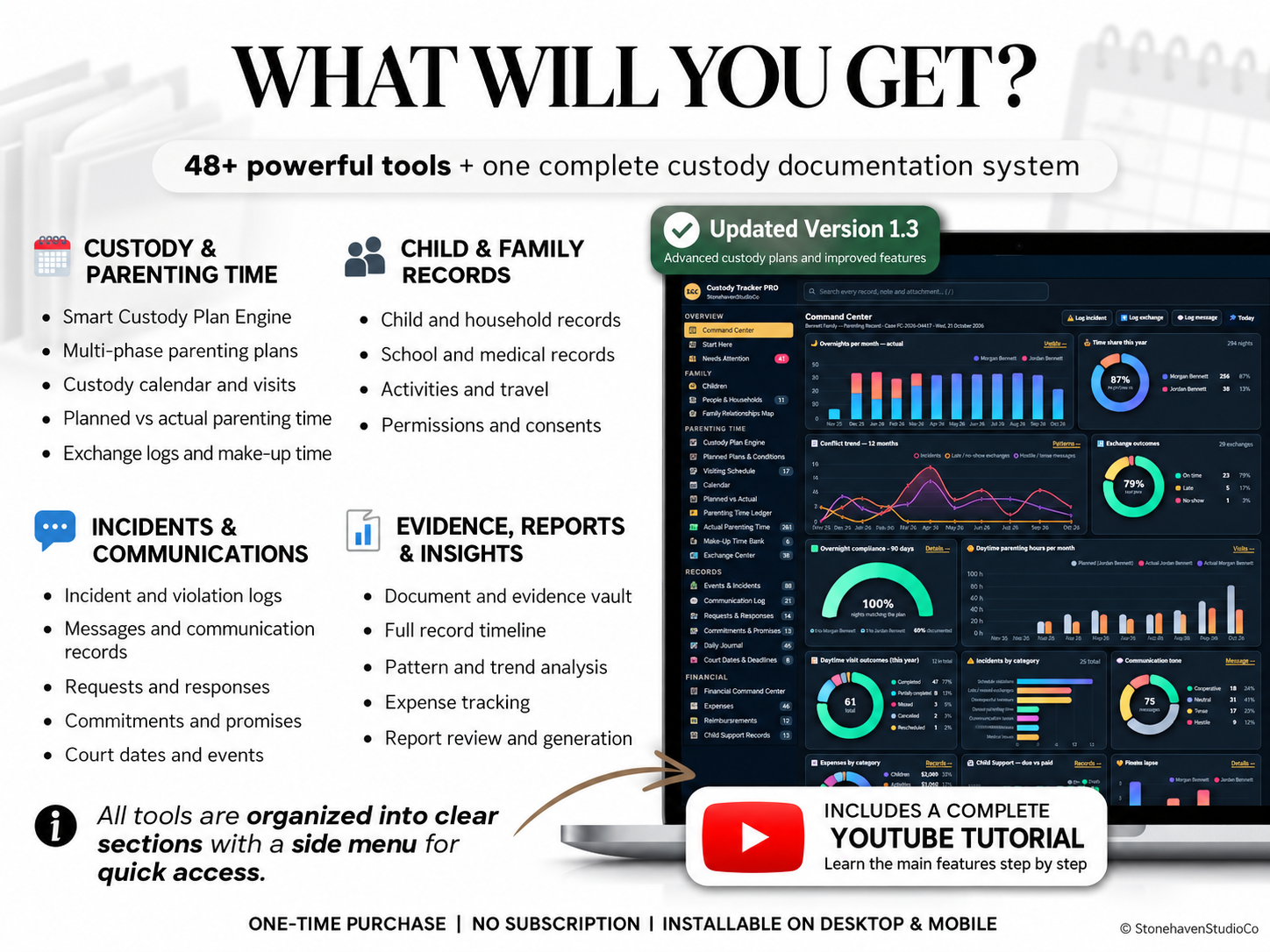
ONE COMPLETE SYSTEM. 48+ POWERFUL TOOLS.
Document what happened. Track what was agreed upon. Organize your evidence. Review recurring patterns. Prepare structured reports.
All from one centralized high conflict custody tracker.

✨ WHAT YOU GET WITH YOUR PURCHASE
✅ Lifetime Access — Access High Conflict Custody Tracker PRO Cloud with a one-time purchase.
✅ 48+ Integrated Tools — A comprehensive custody documentation and case organization system.
✅ Your Own Private Cloud Account — Secure sign-in using your email and password.
✅ Personal Activation Code — A unique activation code provided separately after purchase.
✅ Access PDF — Downloadable instructions with the permanent application link.
✅ Automatic Cloud Synchronization — Keep your records synchronized across your computer, tablet, and smartphone.
✅ Controlled Attorney Sharing — Invite your attorney or another trusted person with customizable access permissions.
✅ Permanent Activity Log — Review who performed actions and when.
✅ Professional Reports & Case Book — Generate organized, printable custody documentation.
✅ Offline Capability — Continue working offline and synchronize supported changes when your internet connection returns.
✅ Backup & Restore — Download backups of your information whenever needed.
One-time payment. No recurring subscription fees. No physical product or shipping required.
☁️ WHY CHOOSE THE CLOUD EDITION?
🔄 AUTOMATIC SYNC ACROSS YOUR DEVICES
Add an incident from your phone, review it on your laptop, and access your records from your tablet.
Your high conflict custody tracker stays connected through your private account.
📶 WORK ONLINE OR OFFLINE
Continue documenting information even when an internet connection is temporarily unavailable.
Supported offline changes are saved locally and synchronized when connectivity returns.
🔐 YOUR PRIVATE ACCOUNT
Sign in with your personal email and password.
Your records are accessible to you and to people you explicitly authorize through the sharing system.
🔑 PERSONAL ACTIVATION
Each purchase includes one unique activation code for creating one account.
💾 BACKUP & RESTORE
Maintain additional control of your information by downloading a full backup whenever needed.
👥 SHARE WITH YOUR ATTORNEY — YOU REMAIN IN CONTROL
Collaborate with your attorney or trusted professionals without surrendering control of your records.
👁 VIEW-ONLY ACCESS
Invited users can review the information and reports you authorize without modifying your records.
✏️ SUGGEST CHANGES
Authorized collaborators can propose additions or corrections. Their suggestions are not applied until you approve them.
✅ APPROVE OR REJECT
Review suggested changes and decide whether to accept or reject them.
🚫 REVOKE ACCESS
Remove a collaborator’s access whenever necessary.
🔒 PERMANENT ACTIVITY HISTORY
Maintain a detailed history of actions, suggestions, approvals, rejections, and invitations.
Activity entries include the relevant person’s identity and timestamp and cannot be edited or deleted through the application interface.
Your records. Your permissions. Your decisions.
🧰 EXPLORE ALL 48+ INCLUDED TOOLS
One integrated system designed to organize the different aspects of custody documentation and case management.
🏠 OVERVIEW & COMMAND CENTER
🏠 Command Center
🚀 Start Here
🔔 Needs Attention
👨👩👧 FAMILY & HOUSEHOLD MANAGEMENT
🧒 Child 360°
👶 Children
👥 People & Households
🕸 Family Relationship Map
🗓 PARENTING TIME & CUSTODY SCHEDULES
🗓 Custody Plan Engine
🪜 Phased Plans & Conditions
🧪 Testing Records
📅 Calendar
📊 Planned vs Actual
📒 Parenting Time Ledger
✅ Actual Parenting Time
⏳ Make-Up Time Bank
🔁 Exchange Center
📝 INCIDENTS, COMMUNICATIONS & CASE RECORDS
⚠️ Events & Incidents
💬 Communication Log
📨 Requests & Responses
🤝 Commitments & Promises
📓 Daily Journal
⚖️ Court Dates & Deadlines
💰 CHILD SUPPORT & FINANCIAL MANAGEMENT
💼 Financial Command Center
🧾 Expenses
💸 Reimbursements
🏦 Child Support Records
🎒 CHILD LIFE & DAILY RESPONSIBILITIES
🎓 School Center
🩺 Medical Center
⚽ Activities Center
✈️ Travel Center
✍️ Permissions & Consents
🎒 Belongings Tracker
🗂 EVIDENCE & DOCUMENT MANAGEMENT
🗂 Document Vault
🔒 Evidence Vault
📎 Attachments — Photos, PDFs & Screenshots
📈 PATTERN ANALYSIS & HISTORICAL REVIEW
🧭 Master Timeline
🧪 Consistency Checker
📈 Pattern Analytics
🔎 Reconstruct Day
▶️ Custody Replay
🕰 Time Machine
⚖️ Period Comparison
📘 REPORTS & SEARCH
📘 Reports & Case Book
🔍 Global Search
⚙️ SETTINGS, SECURITY & DATA MANAGEMENT
💾 Backup & Restore
👥 Sharing & Activity
🗄 Legacy Archive
🗑 Trash / Restore
⚙️ Settings & Appearance
📊 TURN SCATTERED INFORMATION INTO ORGANIZED DOCUMENTATION
Instead of searching through old messages, screenshots, calendars, and spreadsheets, maintain structured records of:
✅ Parenting schedules and actual parenting time
✅ Missed, delayed, or modified visitations
✅ Custody exchanges and related incidents
✅ Important communications and requests
✅ Commitments, promises, and responses
✅ Child support payments and financial obligations
✅ Shared expenses and reimbursements
✅ School, medical, and child-related information
✅ Documents, photos, and supporting evidence
✅ Court dates, deadlines, and case-related tasks
✅ Recurring patterns and historical comparisons
Find the details you need without relying on memory alone.
📘 PROFESSIONAL REPORTS & PRINTABLE CASE BOOK
Transform your recorded information into structured reports that are easier to review, organize, and share.
Use the integrated reporting tools to:
- Organize relevant events chronologically.
- Review parenting-time records.
- Examine recurring patterns and discrepancies.
- Summarize financial records.
- Prepare printable documentation.
- Compile information into a structured Case Book.
Designed to help you present your own records clearly when discussing custody matters with your attorney or other authorized professionals.
💻 WORKS ACROSS YOUR DEVICES
High Conflict Custody Tracker PRO Cloud is a browser-based application compatible with modern devices.
✅ Windows computers
✅ Mac computers
✅ Android smartphones and tablets
✅ iPhones and iPads
✅ Modern desktop and mobile browsers
Supported browsers include Chrome, Edge, Safari, and Firefox.
No complicated software installation required.
You can also add the application to your device’s home screen for convenient access, similar to a regular app.
🚀 HOW TO GET STARTED
STEP 1 — COMPLETE YOUR PURCHASE
Purchase High Conflict Custody Tracker PRO Cloud and download your access PDF containing the application link and setup instructions.
STEP 2 — RECEIVE YOUR ACTIVATION CODE
Your unique activation code is provided separately after purchase.
STEP 3 — CREATE YOUR PRIVATE ACCOUNT
Open the application, select “Create Account,” and enter your email address, password, and activation code.
STEP 4 — SET UP YOUR CUSTODY WORKSPACE
Follow the built-in “Start Here” guidance to add your children, relevant people, and custody arrangements.
STEP 5 — ACCESS YOUR ACCOUNT ON OTHER DEVICES
Sign in using the same email address and password on your computer, tablet, or smartphone.
Your synchronized records will be available through your account.
💻 SYSTEM REQUIREMENTS
- A computer, tablet, or smartphone with a modern web browser.
- Internet access for account sign-in and cloud synchronization.
- A valid activation code to create your account.
- No additional desktop software required.
❓ IMPORTANT PURCHASE INFORMATION
Is this a spreadsheet?
No. High Conflict Custody Tracker PRO Cloud is a fully functional, interactive web application — not an Excel spreadsheet or Google Sheets template.
Is there a monthly subscription?
No. This product is sold as a one-time purchase with lifetime access, without recurring subscription fees.
Can I access it from multiple devices?
Yes. Sign in to your cloud account on compatible devices to access synchronized records.
Can my attorney review my documentation?
Yes. The Cloud Edition includes controlled sharing permissions, allowing you to invite authorized collaborators.
Can I work without internet access?
Yes. Supported offline changes can synchronize when connectivity returns. An internet connection is required for sign-in and synchronization.
Will I receive a physical product?
No. This is a digital product. Nothing will be physically shipped.
Where is my activation code?
Your personal activation code is provided separately after purchase and is not printed inside the access PDF.
Can I activate multiple accounts with one code?
No. Each activation code activates one account.
⚠️ IMPORTANT NOTES
- This product is a digital custody documentation and organizational tool.
- Each activation code is intended for one account.
- Keep your password and private access information secure.
- Do not share your password or invitation codes with unauthorized individuals.
- High Conflict Custody Tracker PRO Cloud helps you organize and document information. It does not provide legal advice, replace professional legal services, or guarantee any particular court outcome.
- Consult a qualified family law attorney for legal guidance regarding your individual circumstances.
💛 TAKE CONTROL OF YOUR CUSTODY DOCUMENTATION
Important dates. Parenting schedules. Exchanges. Evidence. Financial records. Communications. Professional reports.
Everything organized in one powerful cloud-based workspace.
☁️ CUSTODY TRACKER PRO CLOUD
48+ Powerful Tools | Secure Cloud Sync | Controlled Attorney Sharing | One-Time Purchase
Stop searching through scattered records. Start building a clear, organized history of the information that matters.
Get High Conflict Custody Tracker PRO Cloud Today.
Created by StonehavenStudioCo.
Why parents choose this high conflict custody tracker
In a high-conflict co-parenting situation, memory is not enough. Weeks and months blur together, and when you finally sit down with your lawyer or mediator, you need dates, times and details, not a general feeling that things went wrong. A high conflict custody tracker gives you one consistent habit: write it down the same day, in the same place, in the same structure. Over time those small entries become a clear, organised history.
This high conflict custody tracker is designed around that habit. Logging an exchange or an incident takes less than a minute on your phone. Each entry is dated, categorised and searchable, and you can attach photos, screenshots and PDFs. Later, the master timeline, pattern analytics and reports turn hundreds of entries into a picture that is easy to review.
How the high conflict custody tracker works day to day
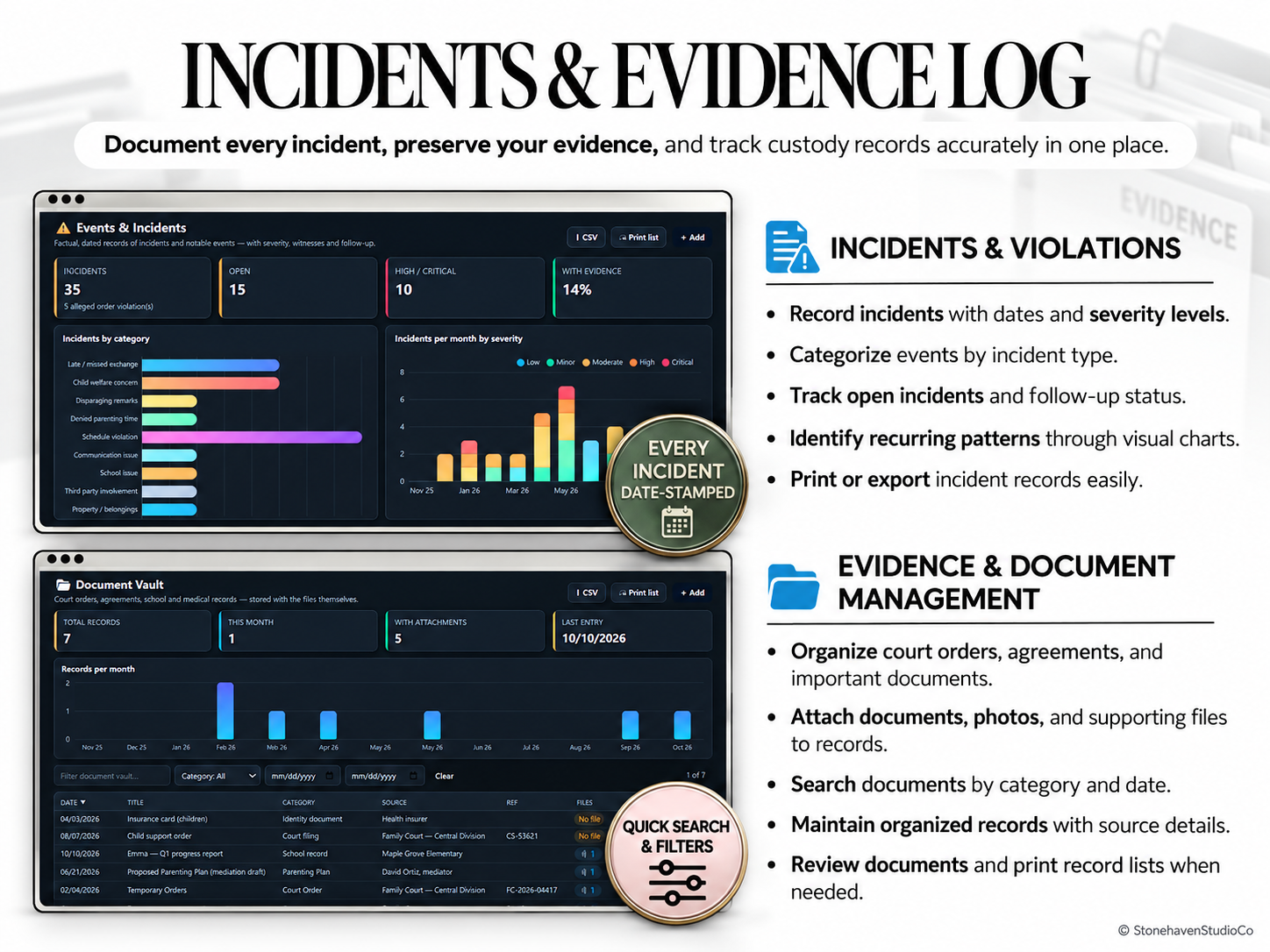
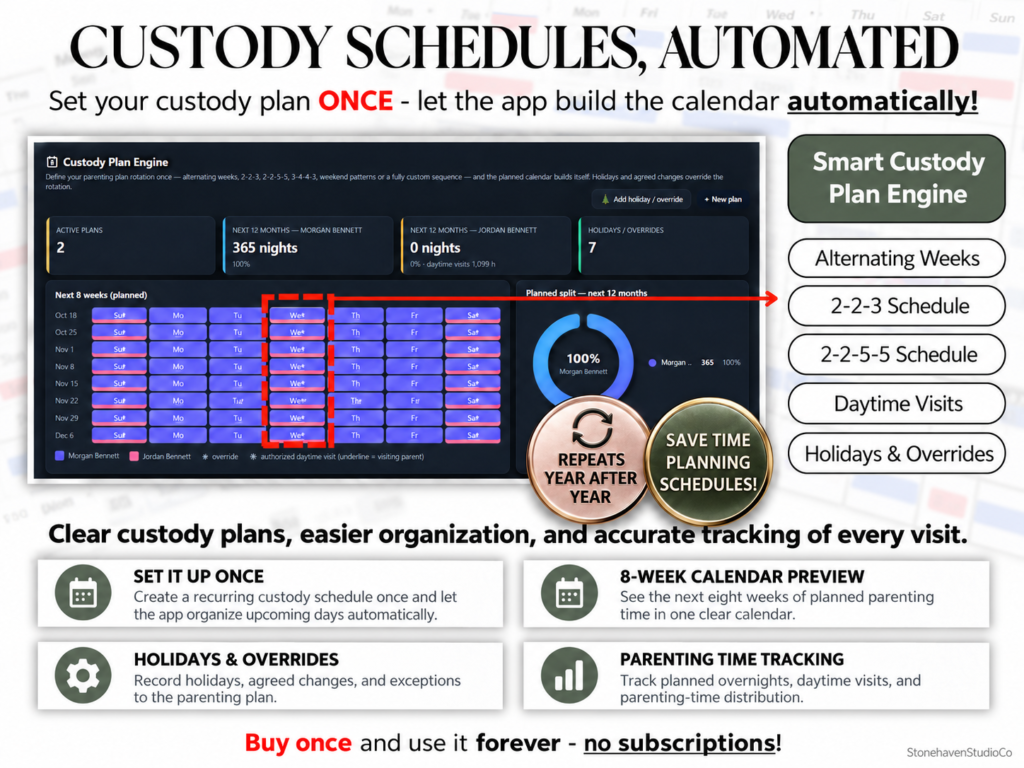
Set up your custody plan once. Choose alternating weeks, 2-2-3, 2-2-5-5, daytime visits or a custom schedule, and add holidays and overrides. The custody plan engine builds the calendar automatically, so you always know whose time it is.
Log what actually happens. Record each exchange with the time, place and who was present. Mark late arrivals, missed visits and make-up time. The planned vs actual view and the parenting time ledger show the real distribution of overnights and days.
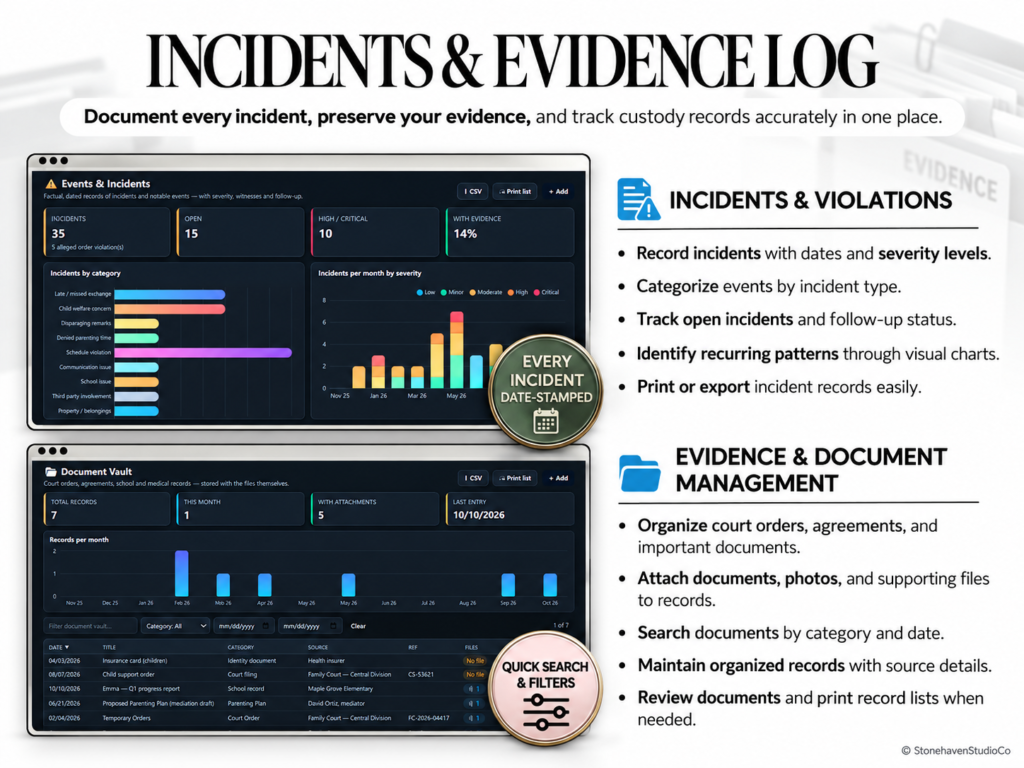
Document incidents and communication. Use the events and incidents log with severity levels, the communication log for messages and calls, and the requests and responses tracker for agreements and refusals. The daily journal keeps short notes about the children’s well-being.
Track money. Record expenses, reimbursements and child support payments with receipts, so you can show exactly what was paid, requested and still outstanding.
Keep evidence organised. Store court orders, agreements, school reports and medical letters in the document vault and evidence vault, linked to the relevant entries.
Review and report. The consistency checker, pattern analytics and “reconstruct a day” tool help you review your records. Generate printable reports and a case book for your attorney.
Getting started with your high conflict custody tracker
Day one: activate your account, add your children and the other parent, and enter your custody schedule. Day two: add the court order or parenting plan to the document vault. From then on, open the high conflict custody tracker after every exchange and every important message. A few minutes a day is all it takes.
After a month you will already see patterns in the planned vs actual view. After three months your high conflict custody tracker holds a detailed, organised history that would be almost impossible to rebuild from memory. That is the real value: not one dramatic entry, but steady, factual records that speak for themselves.
Many parents tell us the biggest change is emotional. When every exchange, message and expense is safely recorded in the high conflict custody tracker, you no longer have to carry every detail in your head. You can stop replaying conversations at night, because the facts are written down and easy to find. That calm, organised feeling is why a high conflict custody tracker is one of the most valuable tools a parent in a difficult co-parenting situation can have. It gives you clarity today and confidence for every meeting with your lawyer or mediator.
Share safely with your attorney
Invite your attorney or another trusted person with view-only access or permission to suggest changes. Suggestions are only applied when you approve them, and you can revoke access at any time. A permanent activity history shows who did what and when, so your records stay under your control.
Cloud or private edition?
This is the cloud edition of the high conflict custody tracker: your records sync across your devices through your private account and you can share access with your attorney. If you prefer a version that keeps everything only on one device, the private edition of High Conflict Custody Tracker PRO is also available in the Stonehaven StudioCo shop.
Who this high conflict custody tracker is for
It is made for separated and divorced parents in high-conflict situations, parents preparing for mediation or a custody review, parents who need to track parenting time and child support, and anyone who wants calm, factual records instead of scattered screenshots. It does not replace legal advice, but it helps you give your lawyer organised information.
High conflict custody tracker FAQ
Do I need to install software? No. The app works in your browser on computer, tablet and phone, and can be added to your home screen.
Can I use it offline? Yes. You can keep documenting offline, and supported changes sync when your connection returns.
Is there a monthly fee? No. It is a one-time purchase with no recurring subscription.
Can I back up my records? Yes. Download a full backup whenever you need it.
Can my attorney see my records? Only if you invite them, and only with the permissions you choose.



Reviews
There are no reviews yet.