



Description
🏆 HIGH CONFLICT CUSTODY PRO
Child Custody Tracker App | Parenting Time, Visitation Log, Incident Reports & Court Evidence Organizer
High Conflict Custody PRO is a private custody tracker app for parents who need clear, dated records of parenting time, exchanges, incidents, communication, expenses and evidence. This custody tracker app keeps everything on your own device, works offline, and turns daily notes into organised reports you can share with your attorney.

⭐ 48 POWERFUL SECTIONS | 10 PROFESSIONAL REPORTS | ONE-TIME PURCHASE | NO MONTHLY SUBSCRIPTION
Are you searching for a professional child custody tracker, co-parenting documentation app, visitation log, custody incident tracker, or court evidence organizer?
High Conflict Custody PRO brings everything together in one powerful, easy-to-use application designed for parents managing complex custody arrangements and high-conflict co-parenting situations.
Track parenting time, document custody exchanges, record incidents and court order violations, organize communication records, manage child support and shared expenses, store important evidence, and generate professional custody reports — all from one organized system.
Stop juggling scattered messages, screenshots, handwritten notes, spreadsheets, and documents.
One app. One organized system. Complete control over your records.
✅ Real interactive application — NOT an Excel spreadsheet
✅ 48 integrated sections and professional documentation tools
✅ 10 detailed, customizable reports
✅ Parenting time tracking by hours and overnights
✅ Custody incident and court order violation documentation
✅ Evidence, communication, and expense management
✅ Interactive dashboards, charts, and timeline analysis
✅ Private local storage — your records stay on your device
✅ One-time purchase — NO recurring subscription
✅ Works on computers, tablets, and smartphones
🎥 WATCH THE custody tracker app BEFORE YOU BUY
See High Conflict Custody PRO in action!
Explore the professional dashboard, custody tracking tools, incident documentation system, evidence management features, and report generator.
Discover exactly how the custody tracker app works before making your purchase.
▶️ WATCH THE PRODUCT OVERVIEW:
⚖️ TURN SCATTERED CUSTODY RECORDS INTO ONE ORGANIZED SYSTEM
In high-conflict co-parenting situations, keeping accurate records can quickly become overwhelming.
A missed visitation. A delayed exchange. An unanswered message. An unpaid expense. A change in the parenting schedule. An incident that needs documentation.
Over time, these details can become difficult to organize and retrieve.
High Conflict Custody PRO helps you document events as they happen and maintain a structured history of your custody arrangements.
📅 Track scheduled and actual parenting time.
🚨 Record custody incidents and potential court order violations.
💬 Organize co-parenting communication and responses.
📸 Attach photos, screenshots, documents, and recordings.
⏰ Document late exchanges, missed visits, and schedule changes.
💰 Monitor child-related expenses, reimbursements, and support payments.
📊 Analyze custody schedules, patterns, and parenting time statistics.
📑 Generate organized, printable custody documentation reports.
Spend less time searching for information and more time staying organized.

📅 1. CHILD CUSTODY & PARENTING TIME TRACKER
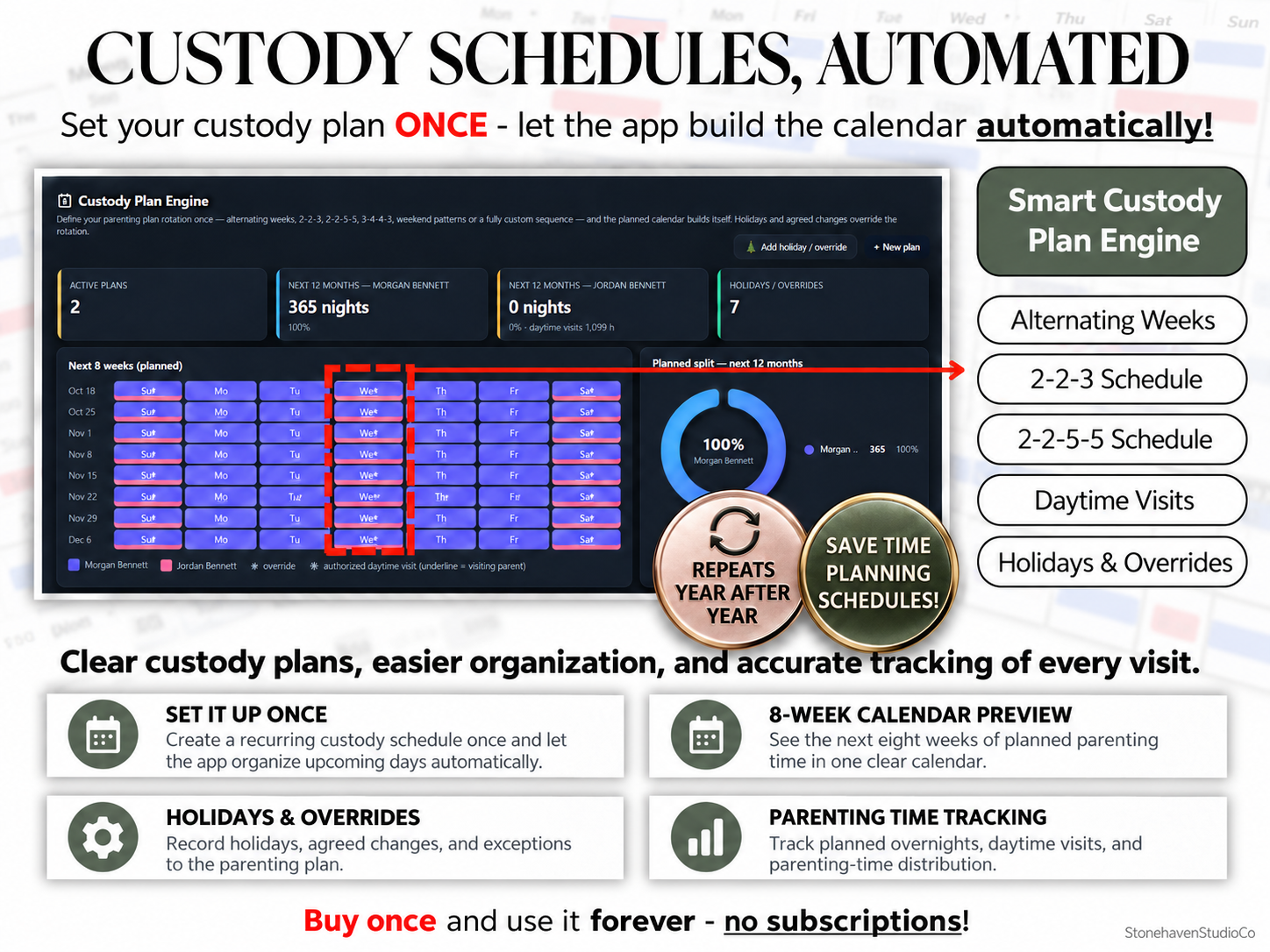
Take control of your parenting time records with an advanced custody scheduling and visitation tracking system.
✔ Create customized parenting plans.
✔ Manage alternating-week, 2-2-3, 2-2-5-5, 3-4-4-3, and other custody schedules.
✔ Track actual parenting time against planned parenting time.
✔ Record overnight stays and daytime visits separately.
✔ Calculate parenting time by hours and overnights.
✔ Monitor missed visitation and make-up parenting time.
✔ Document changes to custody schedules.
✔ Track phased parenting plans and transition conditions.
✔ View your custody schedule through an interactive calendar.
Perfect for documenting parenting arrangements that include daytime visitation without overnight stays.
🚨 2. CUSTODY INCIDENT LOG & COURT ORDER VIOLATION TRACKER
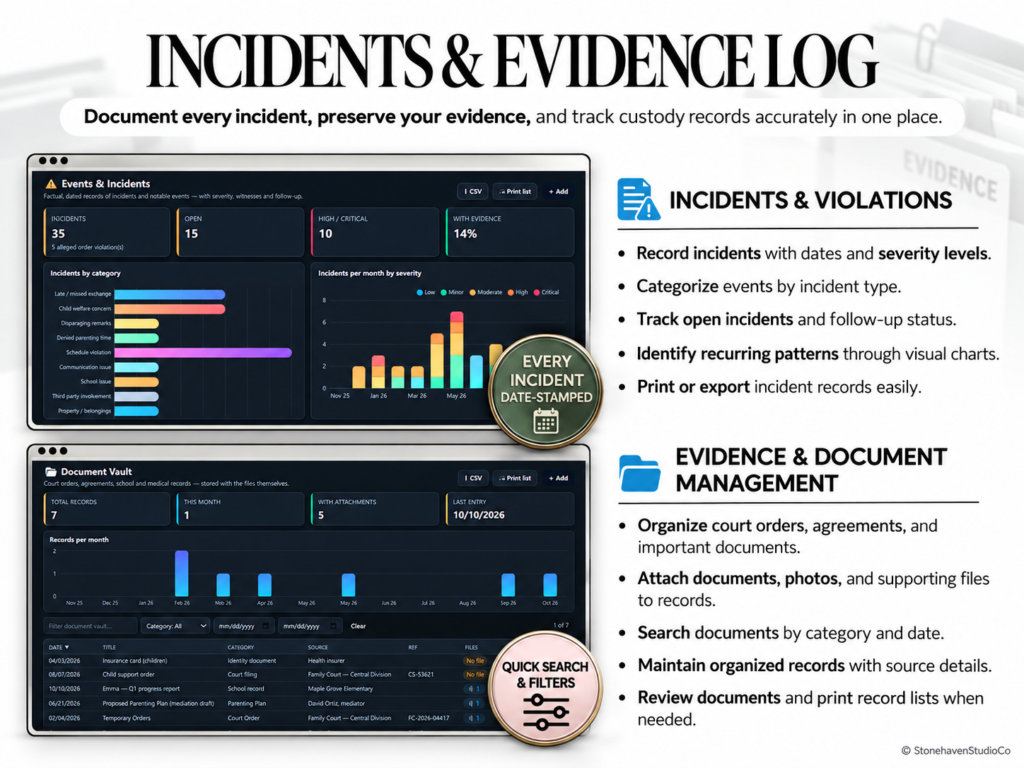
Keep detailed, chronological records of custody-related incidents.
Document important events with relevant dates, times, descriptions, and supporting attachments.
✔ Custody incident reports
✔ Court order violation records
✔ Missed visitation documentation
✔ Late custody exchanges
✔ No-show records
✔ Parenting schedule disagreements
✔ Requests and response tracking
✔ Broken commitments and promises
✔ Supporting evidence attachments
Link each recorded order violation to the relevant order clause, what the order requires, and what actually occurred.
Keep your custody incident documentation organized, searchable, and easy to review.
💬 3. CO-PARENTING COMMUNICATION TRACKER
Keep communication history organized in one central location.
📩 Communication logs
📩 Messages and correspondence records
📩 Requests and responses
📩 Response deadlines
📩 Commitments and promises
📩 Daily journal entries
📩 Communication tone tracking
📩 Important dates and follow-ups
Create a clear timeline of recorded communication and easily revisit important conversations.
📂 4. CUSTODY EVIDENCE & DOCUMENT ORGANIZER
Your important documents deserve more than a scattered collection of files.
Organize custody-related evidence through integrated document and attachment management tools.
📸 Photos and screenshots
📄 PDF documents
🎙️ Audio recordings
🗂️ Custody-related records
🧾 Receipts and expense documentation
📑 Supporting attachments
🔎 Searchable record references
Connect evidence directly to related incidents, parenting time entries, communication records, or other events.
Everything stays organized and connected within your custody documentation system.
💰 5. CHILD SUPPORT & SHARED EXPENSE TRACKER
Stay organized with a dedicated financial record management system.
💵 Record child support amounts due and paid.
🧾 Track child-related expenses.
💳 Manage shared parenting expenses.
🔄 Record reimbursements and outstanding balances.
📊 Review financial summaries and trends.
📁 Attach receipts and supporting documents.
📑 Generate financial reports from your recorded information.
Keep payment histories and shared expense records together without maintaining multiple spreadsheets.
👨👩👧 6. COMPLETE CHILD & FAMILY RECORD MANAGEMENT
Organize important information for each child through dedicated record management tools.
🏫 School records and educational activities
🏥 Medical appointments and health-related information
🎨 Extracurricular activities
✈️ Travel records and arrangements
✅ Permissions and consent records
🎒 Belongings moving between households
👨👩👧 Family members and household contacts
📋 Individual child profiles and linked records
The Child 360° system brings each child’s relevant information together in one organized view.
📊 7. ADVANCED CUSTODY ANALYTICS & INTERACTIVE DASHBOARD
Go beyond basic recordkeeping.
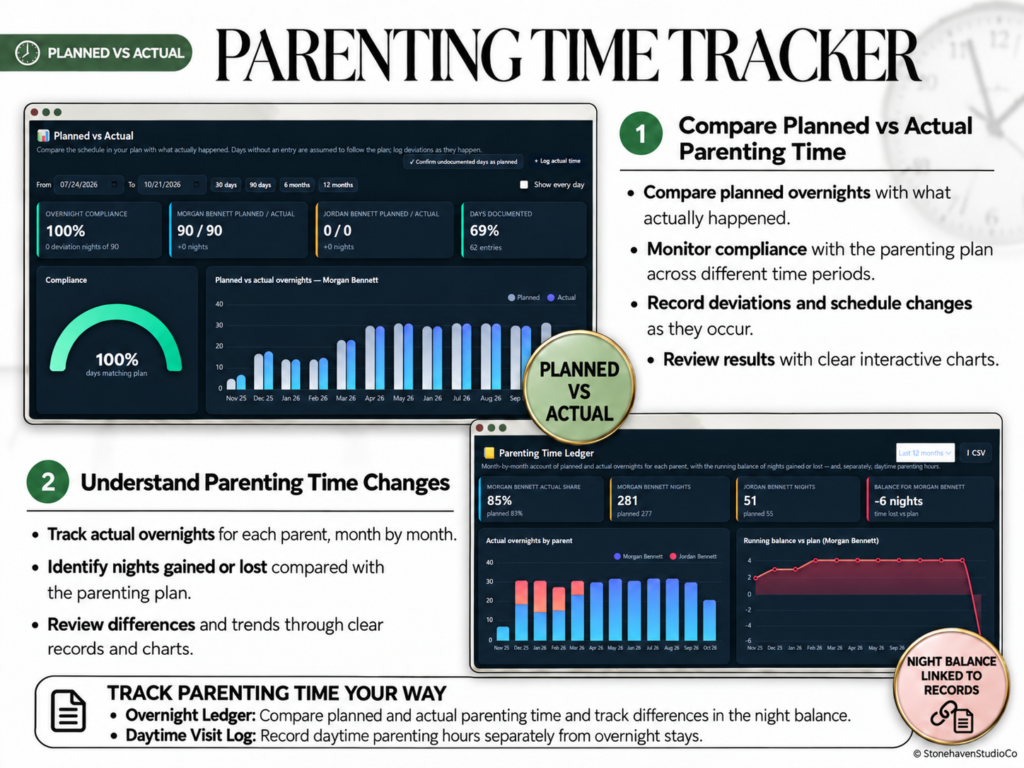
High Conflict Custody PRO includes 14 interactive dashboard charts and advanced analysis tools.
📈 Parenting time distribution
📊 Monthly overnight comparisons
📉 Custody schedule compliance trends
📅 Planned versus actual parenting time
🚨 Recorded incident patterns
🔄 Custody exchange outcomes
💰 Financial tracking summaries
⏳ Historical record comparisons
Additional tools help you:
✔ Review the Master Timeline.
✔ Identify gaps and inconsistencies in records.
✔ Analyze recurring patterns.
✔ Reconstruct a specific day.
✔ Replay parenting time history.
✔ Compare different periods.
✔ Review saved record snapshots.
Turn your recorded information into clear, visual insights.
📑 8. TEN PROFESSIONAL CUSTODY REPORTS
Create structured documentation using the information you have recorded.
The custody tracker app includes:
📘 1. Complete Case Book — A comprehensive organized record collection.
📅 2. Parenting Time Report — Scheduled versus actual parenting time.
🚨 3. Order Violations Report — Recorded court order violation details.
🔄 4. Phased Parenting Plan Report — Parenting plan phases and transitions.
📝 5. Incident Report — Detailed incident documentation.
⏰ 6. Exchange Report — Pickup, drop-off, delays, and missed exchanges.
💬 7. Communication Report — Organized communication history.
💰 8. Financial Report — Expenses, reimbursements, and support records.
👨👩👧 9. Child Report — Individual child information and linked records.
📂 10. Custom Report — Choose exactly which sections to include.
Reports can include cover pages, tables of contents, relevant charts, and attachment indexes.
✅ Preview reports before printing.
✅ Print organized documentation.
✅ Save reports as PDF files.
✅ Customize report contents.
Professional documentation without manually combining dozens of separate files.
🧩 9. ALL 48 INTEGRATED APP SECTIONS
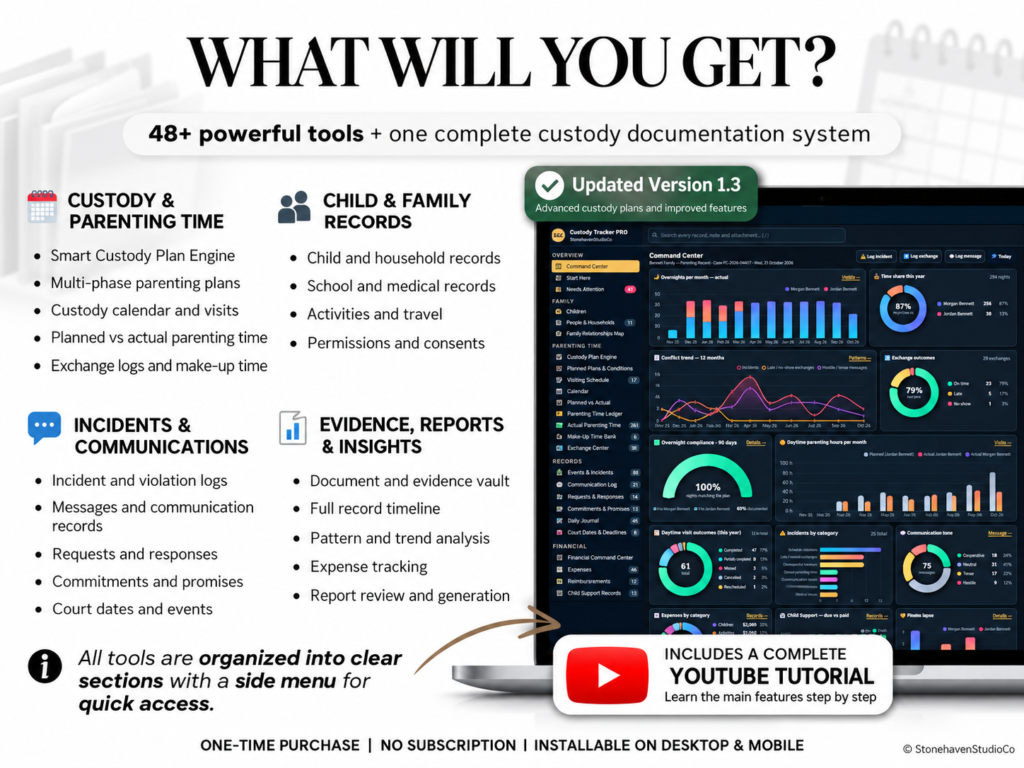
Everything is organized into a connected workspace.
🏠 OVERVIEW
• Command Center
• Start Here
• Needs Attention
👨👩👧 FAMILY
• Child 360°
• Children
• People & Households
• Family Relationship Map
📅 PARENTING TIME
• Custody Plan Engine
• Phased Plans & Conditions
• Testing Records
• Calendar
• Planned vs Actual
• Parenting Time Ledger
• Actual Parenting Time
• Make-Up Time Bank
• Exchange Center
🚨 DOCUMENTATION & RECORDS
• Events & Incidents
• Communication Log
• Requests & Responses
• Commitments & Promises
• Daily Journal
• Court Dates & Deadlines
💰 FINANCIAL MANAGEMENT
• Financial Command Center
• Expenses
• Reimbursements
• Child Support Records
🎒 CHILD LIFE
• School Center
• Medical Center
• Activities Center
• Travel Center
• Permissions & Consents
• Belongings Tracker
📂 EVIDENCE MANAGEMENT
• Document Vault
• Evidence Vault
• Attachments
📊 ANALYSIS & HISTORY
• Master Timeline
• Consistency Checker
• Pattern Analytics
• Reconstruct Day
• Custody Replay
• Time Machine
• Period Comparison
📑 REPORTING & SEARCH
• Reports & Case Book
• Global Search
⚙️ SYSTEM & SETTINGS
• Backup & Restore
• Legacy Archive
• Trash / Restore
• Settings & Appearance
48 powerful sections working together in one comprehensive custody documentation application.
🔒 10. PRIVATE & SECURE — YOUR DATA STAYS YOURS
Your custody records may contain highly personal family information.
That’s why this private edition is designed around local data storage.
🔐 NO CLOUD STORAGE OF YOUR RECORDS
Your entered data stays locally on your device, inside your browser.
🔐 NO ACCOUNT REQUIRED
No email registration or online account is needed to use the custody tracker app.
🔐 PIN PROTECTION
Add an additional layer of protection when opening the custody tracker app.
🔐 AES-256 ENCRYPTED BACKUPS
Create password-encrypted backup files that you control.
🔐 OFFLINE ACCESS
Continue using the custody tracker app offline after its initial setup.
🔐 NO ADVERTISING OR TRACKING
A focused, private documentation environment.
🔐 BACKUP & DEVICE TRANSFER
Export your records and import them onto another supported device.
Your information stays under your control.
Important: This private edition does not automatically synchronize records between devices. Use the backup and restore feature when transferring information or preserving your records.
💎 11. A REAL APP — NOT A SPREADSHEET OR PDF TEMPLATE
Why settle for disconnected templates when you can use a complete interactive application?
❌ NOT an Excel spreadsheet
❌ NOT a Google Sheets template
❌ NOT a blank PDF form
❌ NO complicated spreadsheet formulas
❌ NO monthly subscription fees
✅ Real browser-based application
✅ Installable on supported devices
✅ Interactive charts and dashboards
✅ Connected documentation tools
✅ Built-in custody calendar
✅ Evidence and document management
✅ Professional report generation
✅ Searchable history and records
✅ Six professional color themes, including dark mode
✅ Customizable currency and date formatting
✅ One-time purchase
One powerful application instead of multiple disconnected tools.
🎁 12. WHAT YOU RECEIVE
Your purchase includes:
✅ A downloadable PDF containing your app access link.
✅ The complete High Conflict Custody PRO application.
✅ All 48 integrated sections.
✅ Ten professional report types.
✅ Interactive dashboards and analytics.
✅ A complete fictional demo case with sample records.
✅ Step-by-step Start Here setup guidance.
✅ Customizable custody plans and scheduling tools.
✅ Backup, restore, and device transfer capabilities.
✅ Import support for customers using the original Command Center version.
✅ Six color themes, including dark mode.
✅ Installation support for compatible desktop and mobile devices.
Everything is included with your one-time purchase.
💻 13. WORKS ACROSS YOUR FAVORITE DEVICES
Use High Conflict Custody PRO on supported computers, tablets, and smartphones.
💻 Windows computers
🍎 Mac computers
📱 iPhone
📱 Android phones
📲 iPad and other supported tablets
Supported browsers include Chrome, Edge, Safari, and Firefox.
Installation options may vary depending on your device and browser.
Use your computer for detailed record management or your phone for convenient documentation throughout the day.
⚙️ 14. HOW TO GET STARTED
STEP 1 — PURCHASE
Complete your purchase with our secure checkout.
STEP 2 — DOWNLOAD
Download the included PDF from your order confirmation page, your email, or My account → Downloads.
STEP 3 — OPEN THE custody tracker app
Click the access link inside the PDF to open High Conflict Custody PRO.
STEP 4 — SET UP YOUR RECORDS
Follow the Start Here guide to add family information, children, and your parenting plan.
STEP 5 — START DOCUMENTING
Record parenting time, incidents, communication, evidence, expenses, and important events.
STEP 6 — EXPLORE YOUR REPORTS
Review your dashboard, analyze recorded information, and generate organized reports.
💾 Remember to create regular backups from Backup & Restore.
Why a custody tracker app beats notes and screenshots
Most parents start with notes on their phone, screenshots of messages and a folder of emails. After a few months it becomes almost impossible to find what happened on a specific date, or to show a pattern clearly. A custody tracker app gives every entry the same structure: date, time, type, people involved, details and attachments. That consistency is what makes records easy to search, review and summarise.
With this custody tracker app you log an exchange in under a minute, attach a photo or screenshot, and move on with your day. Later, the master timeline, planned vs actual parenting time, pattern analytics and ten professional reports turn those small entries into a clear overview. You spend less time reconstructing the past and more time focusing on your children.
A custody tracker app you will actually use
The best custody tracker app is the one you open every day. That is why every screen in this custody tracker app is built for speed: big buttons, smart defaults and quick entry from your phone. Log an exchange at the school gate, note a missed call in the car, or add a receipt at the pharmacy. Because the custody tracker app works offline, you never wait for a connection. Over weeks and months, the custody tracker app quietly builds a complete, organised record, so when you need it, everything is already there. Try the custody tracker app once and you will wonder how you ever managed with notes and screenshots.
Whether you share custody on an alternating week schedule or manage a complex phased plan, this custody tracker app adapts to your situation. Parents use the custody tracker app before mediation, during a custody review, or simply to keep calm, factual records of everyday co-parenting. Wherever you are in the process, a reliable custody tracker app helps you stay organised, focused and prepared.
Private by design
This edition of the custody tracker app keeps your records on your own device. There is no account to create and no cloud server holding your data. You can download a full backup whenever you like and restore it on another device. If you prefer automatic sync across devices and attorney sharing, the cloud edition is available in the Stonehaven StudioCo shop.
Choosing the right custody tracker app
Look for a custody tracker app that is fast to use every day, flexible enough for your real schedule, and able to produce clear reports. It should handle exchanges, missed visits, make-up time, communication, expenses and evidence in one place, instead of forcing you to combine several apps. It should protect your privacy and avoid monthly fees that become another bill. High Conflict Custody PRO was built around these needs, with 48 integrated sections and a one-time purchase.
❤️ 15. WHO IS THIS custody tracker app DESIGNED FOR?
High Conflict Custody PRO is especially useful for:
👨👧 Parents managing high-conflict custody arrangements.
👩👦 Mothers and fathers tracking parenting schedules.
🤝 Parents coordinating shared custody and co-parenting responsibilities.
📅 Parents needing accurate visitation and parenting time records.
🚨 Parents documenting recurring custody incidents.
💬 Parents organizing communication and response histories.
📂 Parents managing large collections of custody-related evidence.
💰 Parents tracking shared child expenses and support payments.
📊 Parents who want clearer, more organized family records.
Whether you are just beginning to organize your custody information or already have extensive records, this custody tracker app gives you the tools to manage everything in one place.
🛍️ IMPORTANT PRODUCT INFORMATION
📦 DIGITAL PRODUCT: No physical item will be shipped.
💳 ONE-TIME PURCHASE: No recurring subscription fees.
💻 REAL APPLICATION: Not an Excel spreadsheet, Google Sheets template, or printable-only product.
🔐 PRIVATE EDITION: Records are stored locally on your device and browser.
💾 BACKUP RECOMMENDED: Regular backups help protect your records from accidental data loss.
📁 PERSONAL USE: Reselling, copying for redistribution, or redistributing the custody tracker app is not permitted.
💬 WE’RE HERE TO HELP
We want you to feel confident using your new custody documentation tools.
If you have questions about accessing the custody tracker app, setting up parenting schedules, managing records, importing existing data, or creating backups, please contact us at support@stonehavenstudioco.com or through our Contact page.
We’re happy to help you get the most from your purchase.
Your experience matters to our small shop. ❤️
🌟 ORGANIZE YOUR RECORDS WITH CONFIDENCE
HIGH CONFLICT CUSTODY PRO
📅 Track Parenting Time
🚨 Document Custody Incidents
📂 Organize Evidence
💬 Manage Communication
💰 Track Expenses
📊 Analyze Custody Records
📑 Generate Professional Reports
🔒 Keep Your Information Private
48 PROFESSIONAL SECTIONS. 10 REPORTS. ONE COMPLETE APP.
ONE-TIME PURCHASE — NO MONTHLY SUBSCRIPTION.
Thank you for supporting StonehavenStudioCo. ❤️
⭐ YOUR REVIEW MAKES A DIFFERENCE
If you’ve purchased and used High Conflict Custody PRO, we would truly appreciate your honest review.
Your feedback means so much to our small shop. It helps us continue improving our digital tools and helps other parents discover solutions that may make organizing their custody records easier.
Every review, no matter how short, makes a meaningful difference.
Thank you for your trust, encouragement, and support! ❤️


Reviews
There are no reviews yet.